Bivariate analyses
Up to now, the domain of univariate analyses has allowed us to explore the properties of one variable at the time. Investigating the relationship between two variables is the topic of bivariate analyses. One good visual starting point to identify these is to plot pairwise relationships of all the variables in our dataset.
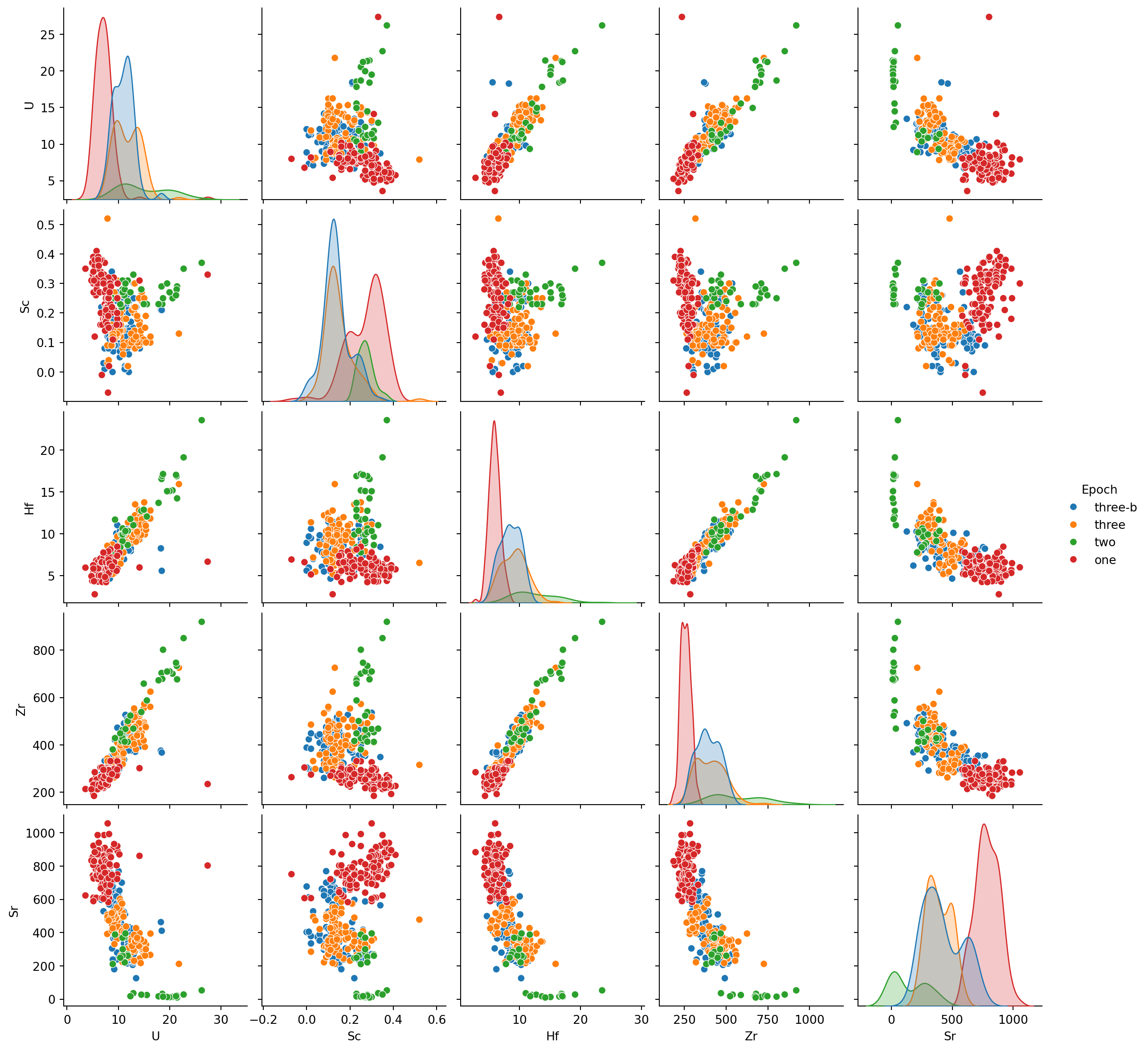
Let’s go back to our df_traces_sub dataset. We can then plot a pairwise comparison plot using Seaborn’s .pairplot() (doc) function (; Listing 1). We use the hue argument of the .pairplot() (doc) function to plot each epoch in a different color:
Function reference: sns.pairplot (doc).
NoteYour turn!
For single variables:
- Based on the parameters described in the previous section and looking at histograms (i.e., the diagonal plot), how would you describe their distributions of values?
- Do they vary across eruptive epochs?
Now, thinking about the relationship between two variables:
- What variables behave in a similar way?
- What variables don’t?
- Do you see any clustering emerge?
Covariance and correlation
From Listing 1 we can fairly intuitively get that some variables show coupled behaviours (e.g., Zr tends to increase whe Hf does), whereas the behaviour of other variables suggests much less coupling (e.g., Sc and Hf).
The first measure used to quantify the joint variability of two random variables \(X\) and \(Y\) is the theoretical covariance, defined as:
\[
\mathrm{Cov}(X,Y) = \mathbb{E}\big[(X - \mathbb{E}[X])(Y - \mathbb{E}[Y])\big],
\]
where \(\mathbb{E}[X]\) and \(\mathbb{E}[Y]\) are the expectations of \(X\) and \(Y\). The covariance captures the direction and magnitude of the linear relationship between the two variables. Positive values indicate that larger values of \(X\) tend to correspond to larger values of \(Y\), and negative values indicate the opposite.
In practice, we rarely know the full distribution of \(X\) and \(Y\), so we compute the sample covariance (Equation 1) as an estimator of the theoretical covariance from a dataset \(x_1, \dots, x_n\) and \(y_1, \dots, y_n\):
\[ \mathrm{Cov}(X,Y)_{\text{emp}}= \frac{1}{n-1}\sum_{i=1}^n (x_i - \bar{x})(y_i - \bar{y}), \tag{1}\]
where \(\bar{x}\) and \(\bar{y}\) are the sample means. In Pandas, this can be computed using the .cov() (doc) function (Listing 2).
The covariance depends on the magnitudes of the variables, so it does not directly reflect the strength of the relationship. To address this, the correlation coefficient provides a normalized version of the covariance, ranging from \(−1\) to \(1\), which indicates both the direction and the strength of the linear relationship. The correlation coefficient is given by:
\[ r(X,Y)= \frac{\mathrm{Cov}(X,Y)}{\sigma_X \sigma_Y} \]
The sample correlation (Equation 2) is defined as \[
r(X,Y)_{\text{emp}} = \frac{\mathrm{Cov}(X,Y)_{\text{emp}}}{s_X s_Y} = \frac{\sum_{i=1}^n (x_i - \bar x)(y_i - \bar y)}{\sqrt{\sum_{i=1}^n (x_i - \bar x)^2}\;\sqrt{\sum_{i=1}^n (y_i - \bar y)^2}},
\tag{2}\] and can be computed in Pandas using the .corr() (doc) function (Listing 2):
where \(s_X\) and \(s_Y\) are the sample standard deviations of \(X\) and \(Y\).
- \(r(X,Y)>0\) indicates a positive relationship between \(X\) and \(Y\) (→ \(Y\) increases when \(X\) does);
- \(r(X,Y)<0\) indicates a negative relationship between \(X\) and \(Y\) (→ \(Y\) decreases when \(X\) increases);
- \(r(X,Y) =0\) indicates independence between \(X\) and \(Y\).
Function reference: drop (doc); cov (doc); print (doc); min (doc); max (doc); corr (doc).
df_traces_sub = df_traces_sub.drop(columns='Epoch')
df_traces_sub.cov()
print(f"The covariance for U ranges from {df_traces_sub.cov()['U'].min():.2f} to {df_traces_sub.cov()['U'].max():.2f}")
print(f"The correlation coefficients for U ranges from {df_traces_sub.corr()['U'].min():.2f} to {df_traces_sub.corr()['U'].max():.2f}")
print('Correlation coefficient:')
df_traces_sub.corr()- 1
- We remove the “Epoch” column using the function drop() as it does not contain numerical values
- 2
- Compute the covariance
- 3
- Compute the correlation coefficient
The covariance for U ranges from -650.77 to 367.09
The correlation coefficients for U ranges from -0.76 to 1.00
Correlation coefficient:| U | Sc | Hf | Zr | Sr | |
|---|---|---|---|---|---|
| U | 1.000000 | -0.238371 | 0.853904 | 0.877320 | -0.761995 |
| Sc | -0.238371 | 1.000000 | -0.154125 | -0.204310 | 0.350124 |
| Hf | 0.853904 | -0.154125 | 1.000000 | 0.954328 | -0.790275 |
| Zr | 0.877320 | -0.204310 | 0.954328 | 1.000000 | -0.844050 |
| Sr | -0.761995 | 0.350124 | -0.790275 | -0.844050 | 1.000000 |
Correlation matrix
Again, we are here interested in getting a first order knowledge of the possible relationships in our entire dataset, and one efficient way to assess correlations amongst many variables is a correlation matrix. A correlation matrix is a square table showing the pairwise correlations between all variables in a dataset. Suppose we have \(p\) variables \((X_1, X_2, \dots, X_p)\). The correlation matrix \(\mathbf{C}\) collects all pairwise correlations:
\[ \mathbf{C} = \begin{pmatrix} 1 & r(X_1,X_2) & \dots & r(X_1,X_p) \\ r(X_2,X_1) & 1 & \dots & r(X_2,X_p) \\ \vdots & \vdots & \ddots & \vdots \\ r(X_p,X_1) & r(X_p,X_2) & \dots & 1 \end{pmatrix}. \]
In practice, we rarely know the true correlations, so each entry \(r(X_i, X_j)\) is typically estimated from a sample, giving the sample correlation between variables \(X_i\) and \(X_j\).
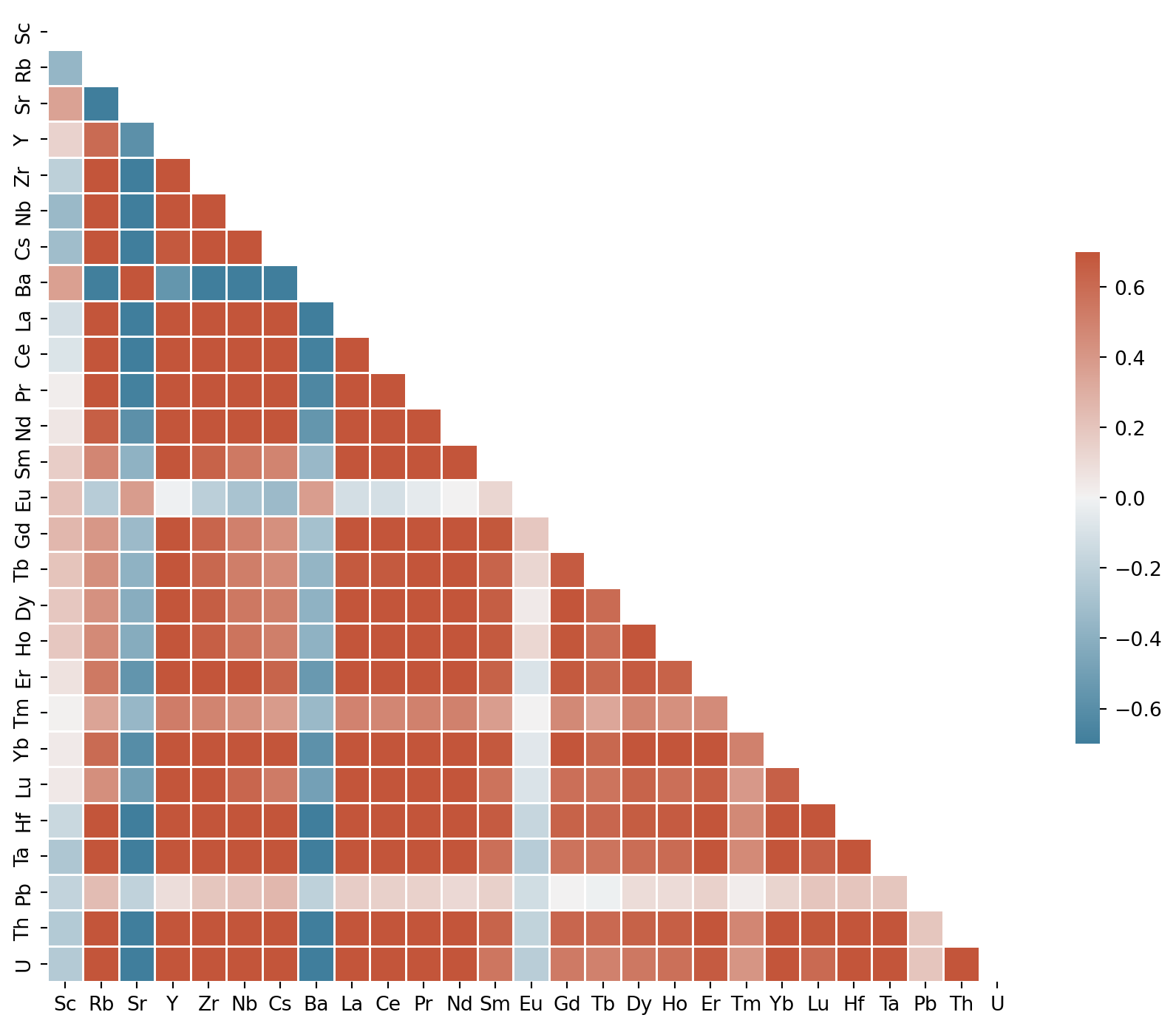
Seaborn does not include a native function to do so, but Listing 3 shows a ready-to-use function to plot one. Don’t hesitate to copy it and reuse it in your codes. Figure 1 shows the resulting plot applied to the concentration columns of the trace elements dataset.
Function reference: corr (doc); np.triu (doc); np.ones_like (doc); plt.subplots (doc); sns.diverging_palette (doc); sns.heatmap (doc).
- 1
- Define a function to plot the correlation matrix. It takes one argument (i.e., a DataFrame)
- 2
- Compute the correlation matrix
- 3
- Generate a mask for the upper triangle
- 4
- Set up the matplotlib figure
- 5
- Generate a custom diverging colormap
- 6
- Draw the heatmap with the mask and correct aspect ratio
Function reference: iloc (doc); corrMatrix (doc).
- 1
- Keep only the numerical columns, i.e., from column index 10 to the last
NoteQuestions
Two variables show relatively strong negative correlations. These are:
Three variables show relatively weak correlations:
A first look at linear regression
Correlation coefficients provide a measure of the coupling between two continuous variables, and linear regressions attempt modelling this relationship. A linear regression is typically expressed as (Equation 3):
\[ y = a + bx + \varepsilon \tag{3}\]
where:
- \(y\): dependent (response) variable
- \(x\): independent (predictor) variable
- \(a\): intercept → value of \(y\) when \(x=0\)
- \(b\): slope → how much \(y\) changes by unit of \(x\)
- \(\varepsilon\): error term
So, the goal of a regression for two continuous variables behaving in a linear fashion is to estimate the values of \(a\) and \(b\) that best fit the observed data.
Seaborn has some high-level functions to plot linear regressions. These functions are designed to provide a quick overview of the model fit rather than a deep statistical investigation (which is commonly achieved using another library called statsmodels). A thorough introduction to linear regression will be the topic of class 4, so for now let’s just focus on the use of the Seaborn functions.
The first function is sns.regplot() (doc), which produces:
- A scatter plot;
- A linear regression model fit;
- A confidence interval (by default 95% in Seaborn obtained through bootstrapping. The idea behind bootstrapping is to i) randomly removing a proportion of original observations from the dataset, ii) refit the model and compare it to the original fit and iii) repeat this a large number of times - typically thousands of times. For a very good fit, removing observations won’t affect greatly the relationship, and the fit with the subset of points will be near to equal the fit with the complete dataset.
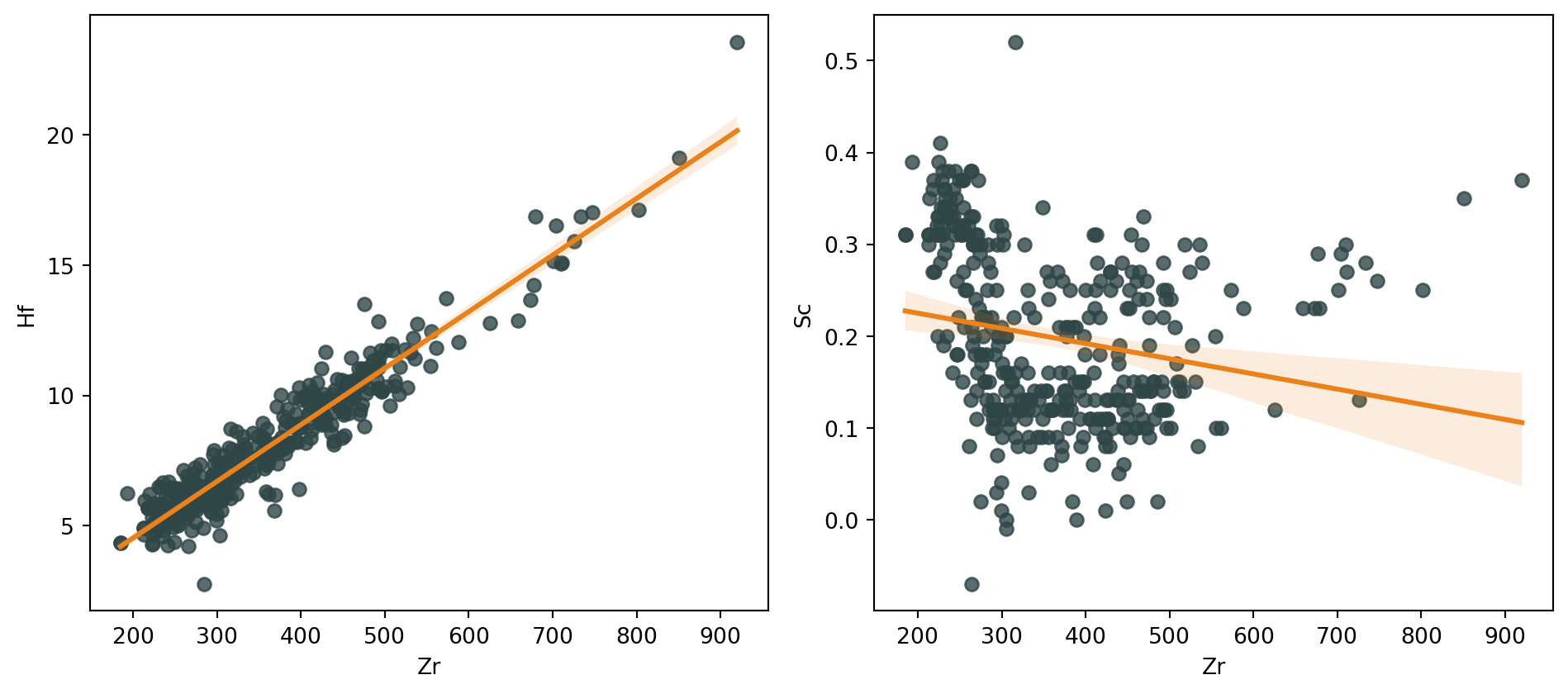
Figure 2 shows two regression plots with the 95% confidence interval. They sure do look pretty, and sns.regplot() (doc) is a great and efficient way to have a first impression at what a first order polynomial fit would look like, but be careful to not over-interpret them. If you want to further explore and constrain linear fits, do turn to statsmodels.
Function reference: plt.subplots (doc); sns.regplot (doc); dict (doc); fig.tight_layout (doc); plt.show (doc).
blue = '#2F4647'
orange = '#EB811B'
fig, [ax1, ax2] = plt.subplots(1,2, figsize=(10,4.5))
sns.regplot(ax=ax1, data=df_traces, x='Zr', y='Hf', color=blue, line_kws=dict(color=orange))
sns.regplot(ax=ax2, data=df_traces, x='Zr', y='Sc', color=blue, line_kws=dict(color=orange))
plt.tight_layout()
plt.show()- 1
- Set colors for plotting
- 2
- Setup the plot. Note that we require 2 axes in 1 row, which returns a list of axes (i.e., [ax1, ax2])
- 3
- These two commands mainly make the plots look good on the website
Residual analysis
An important - but often overlooked - step to estimating a linear regression model is to investigate whether the residuals show any structure. The residual at each data point \(i\) is computed as (Equation 4):
\[ \hat{\varepsilon}_i = y_i - \hat{y}_i \tag{4}\]
where:
- \(y_i\) is the measured value along the y axis;
- \(\hat{y}_i\) is the modelled value along the y axis defined as \(\hat{y}_i = \hat{a} + \hat{b} x_i\), where \(\hat{a}\) and \(\hat{b}\) are the estimated intercept and slope of the linear regression;
- \(\hat{\varepsilon}_i\) is the residual (error term).
Residuals - beyond being used to compute the \(R^2\) coefficient of determination (Equation 5), are critical to:
- Diagnose model fit (→ how much unexplained variation remains);
- Detect patterns that indicate problems (non-linearity, heteroscedasticity, outliers).
\[ R^2 = 1 - \frac{\sum_{i=1}^{n} (y_i - \hat{y}_i)^2}{\sum_{i=1}^{n} (y_i - \bar{y})^2} \tag{5}\]
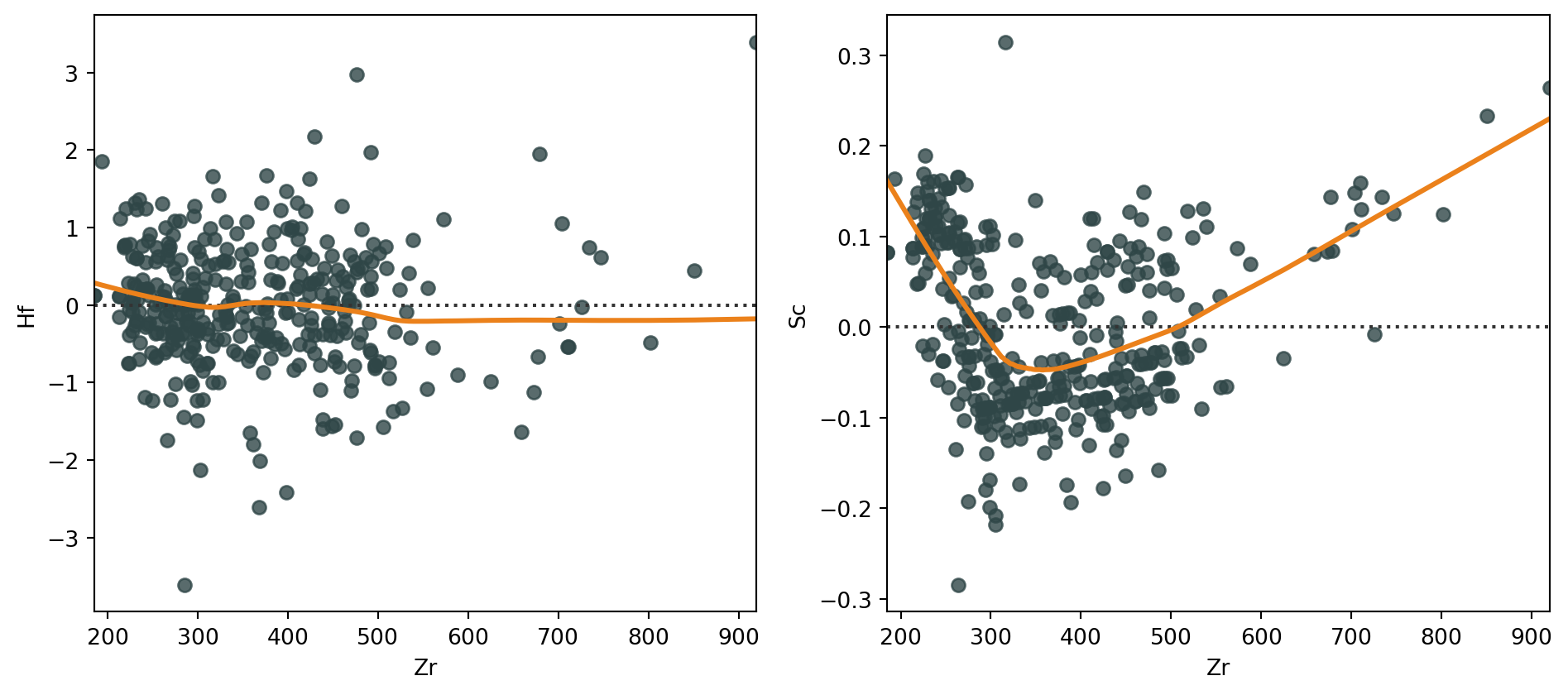
Any type of structure in residuals might reveal a violation of linear regression assumptions. Seaborn’s function sns.residplot() (doc) is designed to help with rapid investigation of the potential structure in residuals. Figure 3 shows the residuals for the same relationships as Figure 2. We add the argument lowess=True to the function, which uses a lowess filter (i.e., think a combination of a moving average except a linear regression is performed rather than an average). This is useful to estimate the structure of the residuals.
Function reference: plt.subplots (doc); sns.residplot (doc); dict (doc); fig.tight_layout (doc); plt.show (doc).
TipEstimating regression fits with Seaborn
Seaborn has a great tutorial on estimating regression fits - be sure to check it out at some point!