- 1
- Get the row for “Calbuco” volcano
Country                    Chile
Date         2015-04-22 00:00:00
VEI                            4
Latitude                -41.2972
Longitude               -72.6097
Name: Calbuco, dtype: objectLet’s now review how we can access data contained in the DataFrame. This process, known as indexing, consists in specifying a row or a column (or ranges of rows and columns) where the data is stored. In pandas, there are two different ways to do that:
label: data is queried using the actual index/column name (e.g., the VEI column in the DataFrame above)location: data is queried using the column location (e.g., the 3rd row)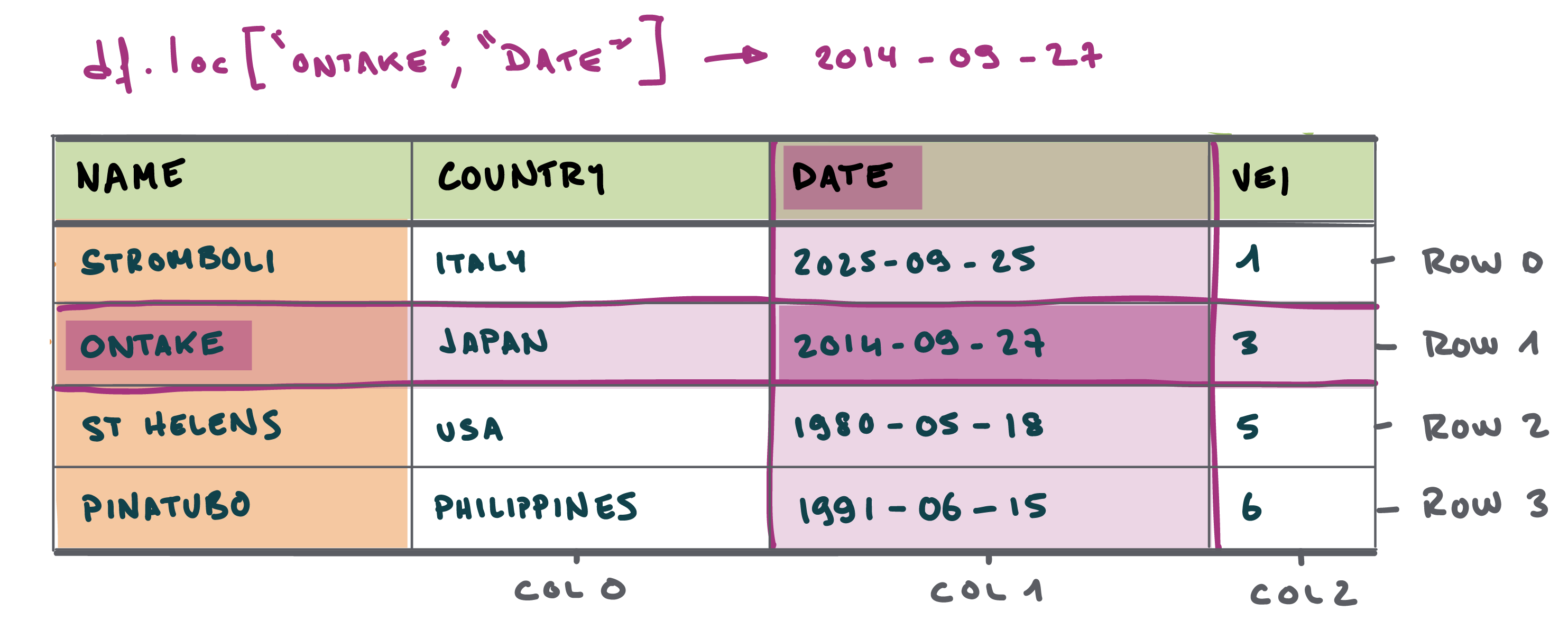
.loc. (doc)
When we know the exact label of the row or the column, we can use the .loc (doc) function to query the DataFrame (Figure 1). Let’s start by querying specific rows. We have previously defined the Name column as the index (i.e., row label), which means that we can simply pass the name of the volcano.
Function reference: loc (doc).
Country Chile
Date 2015-04-22 00:00:00
VEI 4
Latitude -41.2972
Longitude -72.6097
Name: Calbuco, dtype: objectNote that the result is a Series (i.e., a 1-dimensional DataFrame where the columns become the index), not a DataFrame. If we want to keep it as a DataFrame, we can use double brackets. Double brackets can also be used to query multiple rows.
Function reference: loc (doc).
| Country | Date | VEI | Latitude | Longitude | |
|---|---|---|---|---|---|
| Name | |||||
| Calbuco | Chile | 2015-04-22 | 4 | -41.2972 | -72.6097 |
| Taal | Philippines | 2020-01-12 | 4 | 14.0020 | 120.9934 |
What is the VEI recorded for Etna volcano?
What is the eruption date for Taal volcano?
In general, double brackets [[ ]] will return a DataFrame and not a Series. We will dominantly use this in the following examples.
Let’s now query specific columns. For example, querying the VEI column can be achieved in different ways. The simplest is to use the column name directly. We can also query multiple columns using double brackets
| Country | VEI | |
|---|---|---|
| Name | ||
| St. Helens | USA | 5 |
| Pinatubo | Philippines | 6 |
| El Chichón | Mexico | 5 |
| Galunggung | Indonesia | 4 |
| Nevado del Ruiz | Colombia | 3 |
| Merapi | Indonesia | 2 |
| Ontake | Japan | 2 |
| Soufrière Hills | Montserrat | 3 |
| Etna | Italy | 2 |
| Nyiragongo | DR Congo | 1 |
| Kīlauea | USA | 2 |
| Agung | Indonesia | 3 |
| Tavurvur | Papua New Guinea | 3 |
| Sinabung | Indonesia | 3 |
| Taal | Philippines | 4 |
| La Soufrière | Saint Vincent | 4 |
| Calbuco | Chile | 4 |
| St. Augustine | USA | 3 |
| Eyjafjallajökull | Iceland | 4 |
| Cleveland | USA | 3 |
Until now, we have selected either rows or columns. With .loc (doc), we can select both in one expression:
Function reference: loc (doc).
The general pattern is:
Function reference: loc (doc).
The selection before the comma specifies the rows; the selection after the comma specifies the columns.
To keep all rows and select only two columns, use : for the rows:
Function reference: loc (doc).
| Country | VEI | |
|---|---|---|
| Name | ||
| St. Helens | USA | 5 |
| Pinatubo | Philippines | 6 |
| El Chichón | Mexico | 5 |
| Galunggung | Indonesia | 4 |
| Nevado del Ruiz | Colombia | 3 |
| Merapi | Indonesia | 2 |
| Ontake | Japan | 2 |
| Soufrière Hills | Montserrat | 3 |
| Etna | Italy | 2 |
| Nyiragongo | DR Congo | 1 |
| Kīlauea | USA | 2 |
| Agung | Indonesia | 3 |
| Tavurvur | Papua New Guinea | 3 |
| Sinabung | Indonesia | 3 |
| Taal | Philippines | 4 |
| La Soufrière | Saint Vincent | 4 |
| Calbuco | Chile | 4 |
| St. Augustine | USA | 3 |
| Eyjafjallajökull | Iceland | 4 |
| Cleveland | USA | 3 |
For the selections above, this produces the same result as:
| Country | VEI | |
|---|---|---|
| Name | ||
| St. Helens | USA | 5 |
| Pinatubo | Philippines | 6 |
| El Chichón | Mexico | 5 |
| Galunggung | Indonesia | 4 |
| Nevado del Ruiz | Colombia | 3 |
| Merapi | Indonesia | 2 |
| Ontake | Japan | 2 |
| Soufrière Hills | Montserrat | 3 |
| Etna | Italy | 2 |
| Nyiragongo | DR Congo | 1 |
| Kīlauea | USA | 2 |
| Agung | Indonesia | 3 |
| Tavurvur | Papua New Guinea | 3 |
| Sinabung | Indonesia | 3 |
| Taal | Philippines | 4 |
| La Soufrière | Saint Vincent | 4 |
| Calbuco | Chile | 4 |
| St. Augustine | USA | 3 |
| Eyjafjallajökull | Iceland | 4 |
| Cleveland | USA | 3 |
Remember that in Python, indexing starts from 0 - so the first row or column has an index of 0.
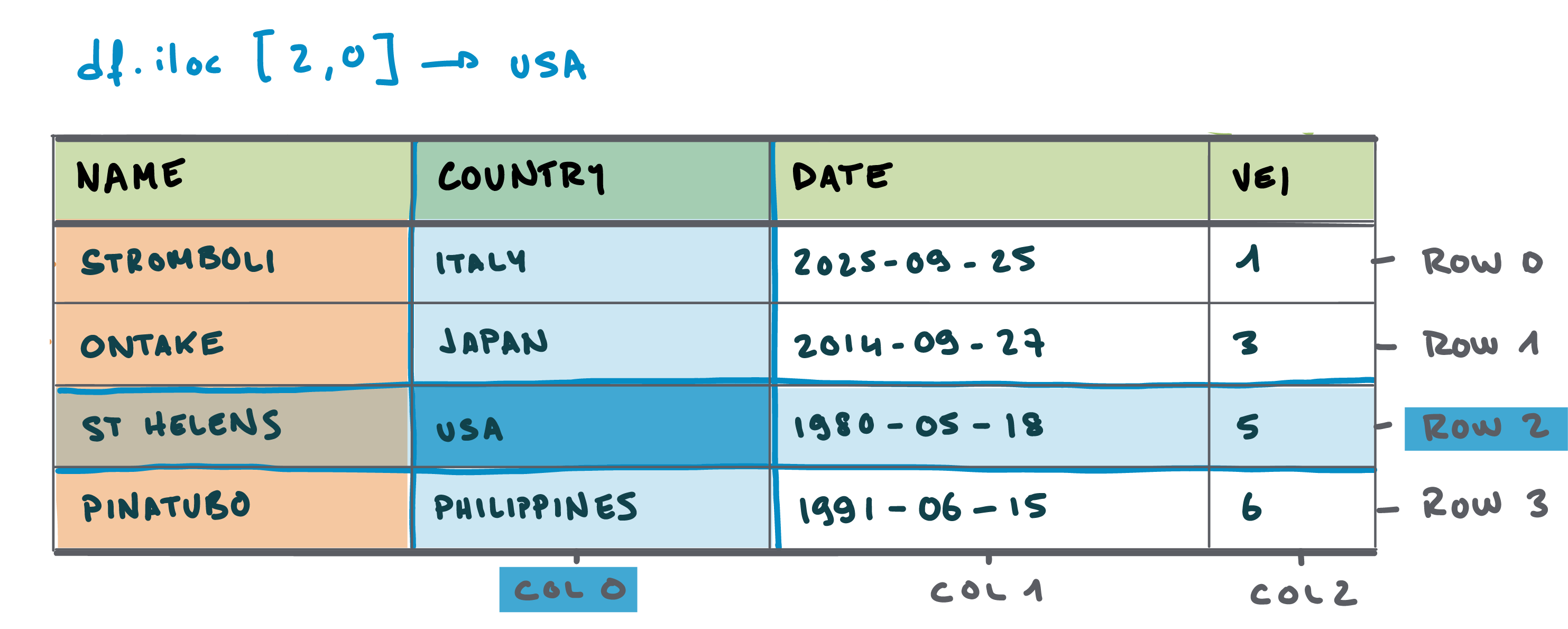
.iloc. (doc)
Some situations require querying data by location instead of label - let’s say for instance we need to retrieve rows 10-20. This is done using the .iloc (doc) function (instead of the .loc (doc) function previously used; Figure 2). Remember that Python uses zero-based indexing (Caution 1), meaning that the first element is at position 0, the second at position 1, and so on.
The next example queries the first row - using again double brackets to return a DataFrame.
Function reference: iloc (doc).
We can get a range of rows using what is called slicing. This is done using the colon (:) operator. The next example queries rows 3 to 6 of the DataFrame. Note that the end index is exclusive, meaning that the element at the end index is not included in the result.
Function reference: iloc (doc).
| Country | Date | VEI | Latitude | Longitude | |
|---|---|---|---|---|---|
| Name | |||||
| El Chichón | Mexico | 1982-03-28 | 5 | 17.3559 | -93.2233 |
| Galunggung | Indonesia | 1982-04-05 | 4 | -7.2567 | 108.0771 |
| Nevado del Ruiz | Colombia | 1985-11-13 | 3 | 4.8950 | -75.3220 |
| Merapi | Indonesia | 2023-12-03 | 2 | -7.5407 | 110.4457 |
To get rows 3 to 6 and columns 2-3:
Function reference: iloc (doc).
To get the last 5 rows of the DataFrame:
Function reference: iloc (doc).
| Country | Date | VEI | Latitude | Longitude | |
|---|---|---|---|---|---|
| Name | |||||
| La Soufrière | Saint Vincent | 2021-04-09 | 4 | 13.2833 | -61.3875 |
| Calbuco | Chile | 2015-04-22 | 4 | -41.2972 | -72.6097 |
| St. Augustine | USA | 2006-03-27 | 3 | 57.8819 | -155.5611 |
| Eyjafjallajökull | Iceland | 2010-04-14 | 4 | 63.6333 | -19.6111 |
| Cleveland | USA | 2023-05-23 | 3 | 52.8250 | -169.9444 |
By experience, position-based queries is more used on rows than columns. For instance, we might want to access the first 10 rows because we don’t know their associated labels, yet it is less likely that we ignore their attributes. It is possible mix label-based and position-based indexing. For example, to get the first 5 rows and the Country and VEI columns:
Function reference: iloc (doc).