Exploratory data analysis

How to start making data talk

Sébastien Biass

Earth Sciences

Stéphane Guerrier

Earth Sciences

Pharmaceutical Sciences

October 22, 2025

Today’s objectives

  • Last week: We learned how to handle data using Pandas
    • Load, access, query, filter, sort and operate on data
  • This week: You received / compiled / produced a new dataset
  • Review common tasks / method to get accustomed to the dataset
    • Understand its structure → what type of data does it contain
    • Explore it visuallyplotting with dedicated libraries
    • Describe single variablesunivariate analyses
    • Assess coupled behaviours of two variablesbivariate analyses
    • First attempt at modelling these behaviours → linear regressions

The dataset

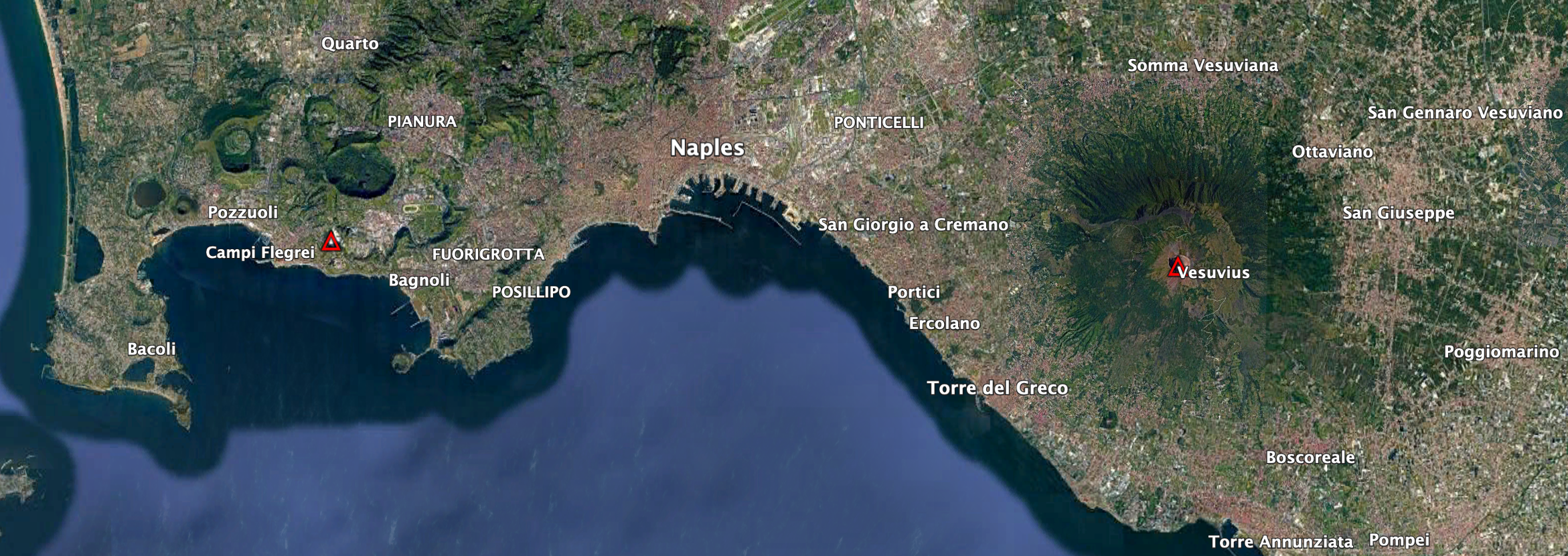
Case study

  • Campi Flegrei: Home to 1.5 million people
  • Caldera-forming eruptions
    • Campanian Ignimbrite (CI), ~39 ka ago
    • Neapolitan Yellow Tuff (NYT), ~15 ka ago
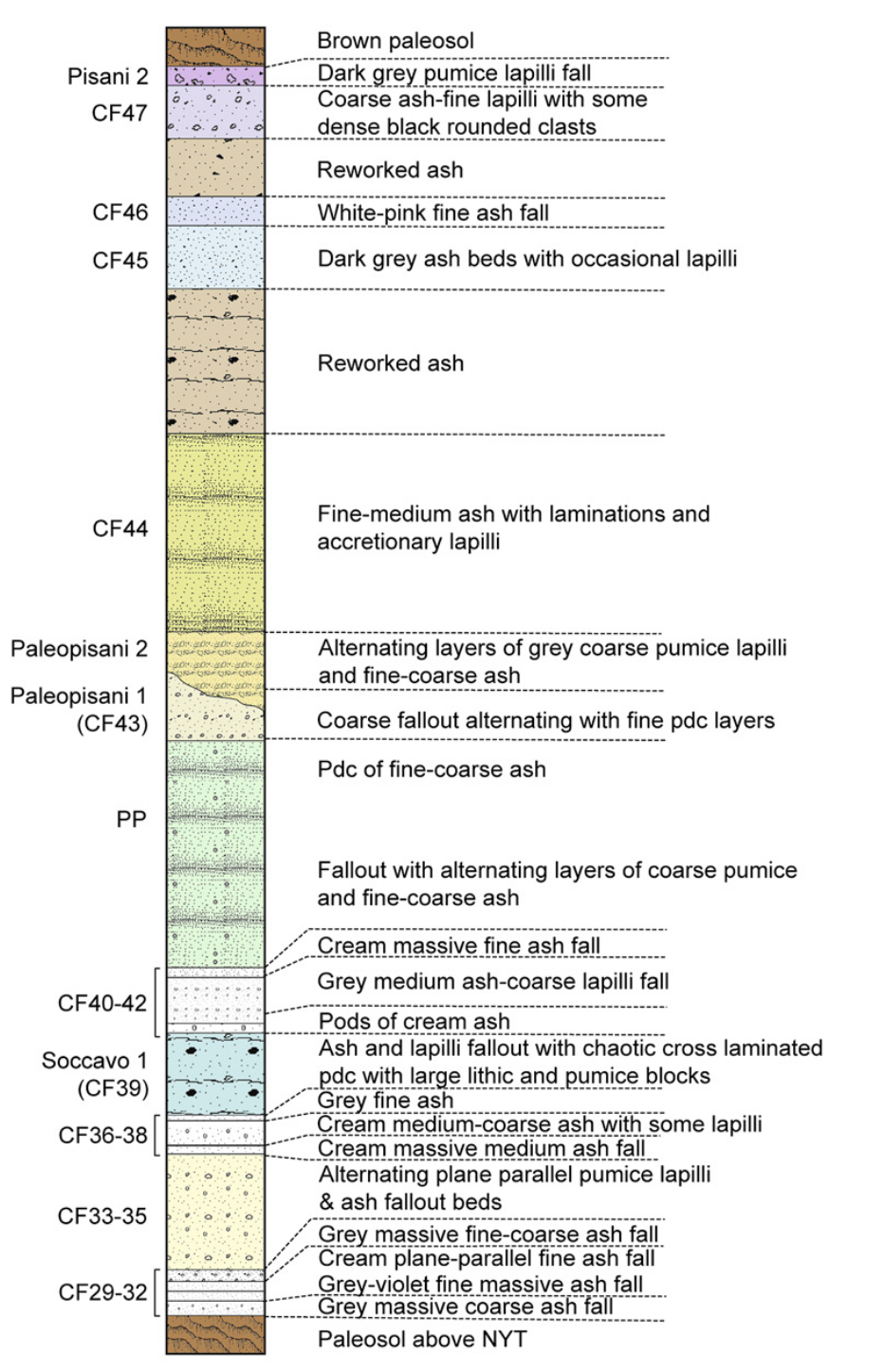
Caldera-forming eruptions cycles

Bouvet de Maisoneuve et al. (2021)

Caldera cycles at Campi Flegrei

Bouvet de Maisoneuve et al. (2021), Forni et al. (2018) →

Dataset

Tephrostratigraphy and glass compositions of post-15 kyr Campi Flegrei eruptions

  • Smith et al. (2011)
  • Major and trace elements

Loading the dataset

  • Import pandas
  • Load an excel file using pandas
  • Specify which sheet to read from using the sheet_name argument
    • Supp_majorsdf_majors
    • Supp_tracesdf_traces

# Load Pandas
import pandas as pd # Import pandas

# Import the dataset specifying which Excel sheet name to load the data from
df_majors = pd.read_csv('https://raw.githubusercontent.com/ELSTE-Master/Data-Science/main/Data/Smith_glass_post_NYT_data_majors.csv')
df_traces = pd.read_csv('https://raw.githubusercontent.com/ELSTE-Master/Data-Science/main/Data/Smith_glass_post_NYT_data_traces.csv')

Inspecting the dataset

df_traces.head(5)
Analysis no. Strat. Pos. Eruption controlcode Sample Epoch Crater size Date of analysis Si/bulk cps SiO2* (EMP) ... Ho Er Tm Yb Lu Hf Ta Pb Th U
0 1915 63 Astroni 7 1 79 three-b 20 100210am 20.21 59.27 ... 1.11 3.26 0.47 2.80 0.43 7.84 2.96 60.93 35.02 9.20
1 1916 63 Astroni 7 1 79 three-b 20 100210am 11.92 59.27 ... 1.08 2.27 0.46 3.14 0.46 7.33 3.52 59.89 34.46 10.46
2 1917 63 Astroni 7 1 79 three-b 20 100210am 17.06 59.27 ... 1.25 3.69 0.61 3.51 0.63 8.43 3.05 49.87 29.22 8.73
3 1918 63 Astroni 7 1 79 three-b 20 100210am 24.52 59.27 ... 1.24 3.72 0.46 3.04 0.44 8.95 3.08 59.59 30.71 9.79
4 1919 63 Astroni 7 1 79 three-b 20 100210am 14.35 59.27 ... 1.08 2.68 0.46 2.79 0.41 7.24 2.67 60.70 32.13 9.01

5 rows × 37 columns

df_traces.info()
<class 'pandas.core.frame.DataFrame'>
RangeIndex: 370 entries, 0 to 369
Data columns (total 37 columns):
 #   Column            Non-Null Count  Dtype  
---  ------            --------------  -----  
 0   Analysis no.      370 non-null    int64  
 1   Strat. Pos.       370 non-null    int64  
 2   Eruption          370 non-null    object 
 3   controlcode       370 non-null    int64  
 4   Sample            370 non-null    object 
 5   Epoch             370 non-null    object 
 6   Crater size       370 non-null    int64  
 7   Date of analysis  370 non-null    object 
 8   Si/bulk cps       370 non-null    float64
 9   SiO2* (EMP)       370 non-null    float64
 10  Sc                370 non-null    float64
 11  Rb                370 non-null    int64  
 12  Sr                369 non-null    float64
 13  Y                 370 non-null    float64
 14  Zr                370 non-null    int64  
 15  Nb                370 non-null    float64
 16  Cs                370 non-null    float64
 17  Ba                370 non-null    float64
 18  La                370 non-null    float64
 19  Ce                370 non-null    float64
 20  Pr                370 non-null    float64
 21  Nd                370 non-null    float64
 22  Sm                370 non-null    float64
 23  Eu                370 non-null    float64
 24  Gd                370 non-null    float64
 25  Tb                370 non-null    float64
 26  Dy                370 non-null    float64
 27  Ho                370 non-null    float64
 28  Er                370 non-null    float64
 29  Tm                370 non-null    float64
 30  Yb                370 non-null    float64
 31  Lu                369 non-null    float64
 32  Hf                370 non-null    float64
 33  Ta                370 non-null    float64
 34  Pb                368 non-null    float64
 35  Th                370 non-null    float64
 36  U                 370 non-null    float64
dtypes: float64(27), int64(6), object(4)
memory usage: 107.1+ KB

Types of data

Basic types of data

  • int: Integer numbers → 0, 1, 2, …
  • float: Decimal numbers → 1.1, 1.2, 1.3, …
  • object: Strings → “Campi Flegrei”

A note on Bytes

  • int and float numbers are followed by 8, 16, 32 or 64 → Byte → control how much memory a variable uses
  • A Bit is a binary digit → 0/1 → smallest possible unit of data
  • int8 can store \(2^8\) digits = 256
  • int16 can store \(2^16\) digits = 65’563

Families of data

Numerical data


  • Represent quantities or measurable values
  • Quantitative
    • Discrete: Earthquake counts
    • Continuous: Temperature
  • Stored as numerical values
  • Operations → arithmetic

Categorical data


  • Represent categories or groups of data
  • Qualitative / semi-quantitative
    • Nominal: No order → Landslide type
    • Ordinal: Order → rank
  • Stored as strings or integer
  • Operations → counting, grouping

Families of data - cheat sheet

Feature Categorical Data Numerical Data
Definition Categories or groups of data Quantities or measurable values
Nature Qualitative (describes qualities) Quantitative (describes amounts or measurements)
Data Type Non-numeric (often text or labels) Numeric (numbers only)
Examples Eruption type Element concentration
Possible Operations Counting, grouping, mode Arithmetic operations
Measurement Scale Nominal or Ordinal Interval or Ratio
Visualization Tools Bar chart, Pie chart Histogram, Box plot, Scatter plot
Subtypes Nominal: Categories with no order (e.g., color); Ordinal: Categories with order (e.g., rank) Discrete: Countable numbers (e.g., number of earthquakes); Continuous: Measurable values (e.g., temperature)
Examples of Statistical Summary Frequency, mode Mean, median, standard deviation
Storage Format Strings or labels Integers or floats

Plotting data

Plotting libraries

There are two main plotting libraries:

  • matplotlib (and its module pyplot): core of plotting in Python
  • seaborn: based on matplotlib, designed for statistical exploration, integration with pandas

import matplotlib.pyplot as plt # Import the pyplot module from matplotlib
import seaborn as sns # Import seaborn

Anatomy of a figure

  • Setup figure: plt.subplots()
  • Returns:
    • fig → figure
    • ax → axes

fig, ax = plt.subplots()

Anatomy of a axes

Axes: Where most of the magic occurs

Function Description
ax.set_title Sets the title of the axes
ax.set_xlabel Sets the label for the x-axis
ax.set_ylabel Sets the label for the y-axis
ax.legend Displays the legend
ax.grid Shows grid lines

Plotting example

# Define some data
data1 = [1, 2, 3, 4, 5, 6, 7, 8, 9, 10]
data2 = [7, 3, 9, 1, 5, 10, 8, 2, 6, 4]

# Set the figure and the axes
fig, ax = plt.subplots()

# Plot the data
ax.plot(data1, data1, color='aqua', label='Line')
ax.scatter(data1, data2, color='purple', label='scatter')

Plotting example

# Define some data
data1 = [1, 2, 3, 4, 5, 6, 7, 8, 9, 10]
data2 = [7, 3, 9, 1, 5, 10, 8, 2, 6, 4]

# Set the figure and the axes
fig, ax = plt.subplots()

# Plot the data
ax.plot(data1, data1, color='aqua', label='Line')
ax.scatter(data1, data2, color='purple', label='scatter')

# Set labels
ax.set_xlabel('x Label')
ax.set_ylabel('y Label')

# Only to make it look pretty on the presentation
plt.show()

Seaborn

Why Seaborn?

Seaborn provides a high-level interface for drawing attractive and informative statistical graphics.

  • Makes plotting pandas DataFrames easy
  • Produces clean graphics
  • Drawback: difficult customisation

Seaborn example

# Define figure + axes
fig, ax = plt.subplots()
# Plot with seaborn (remember, we imported it as sns)
# df_traces is the geochemical dataset imported previously
sns.scatterplot(ax=ax, data=df_traces, x='Rb', y='Sr')

Seaborn example

# Define figure + axes
fig, ax = plt.subplots()
# Plot with seaborn (remember, we imported it as sns)
# df_traces is the geochemical dataset imported previously
sns.scatterplot(ax=ax, data=df_traces, x='Rb', y='Sr', hue='Epoch', size="SiO2* (EMP)")

Your turn!

Descriptive statistics

Descriptive statistics


  • Descriptive statisticsprovide ways of capturing the properties of a given data set or sample.
  • Pandas and Seaborn → review metrics, tools, and strategies to summarize a dataset
  • Providing us with a quantitative basis to describe it and compare it to other datasets

Univariate analyses

Univariate analyses

  • Objective capturing the properties of single variables at the time
  • Fist step: review the samples distribution using histograms
    • Divides dataset into equal intervalsbins
    • Counts the value in each bin
    • Represents the distribution of data

Univariate analyses

  • Objective capturing the properties of single variables at the time
  • Fist step: review the samples distribution using histograms
    • Divides dataset into equal intervalsbins
    • Counts the value in each bin
    • Represents the distribution of data

  Automatic number of bins:

fig, ax = plt.subplots()
# Plot histogram
sns.histplot(data=df_traces, x='Zr', color=blue, alpha=.5)
ax.set_xlabel('Zr (ppm)');
ax.set_title('Zr distribution');

Univariate analyses

  • Objective capturing the properties of single variables at the time
  • Fist step: review the samples distribution using histograms
    • Divides dataset into equal intervalsbins
    • Counts the value in each bin
    • Represents the distribution of data

  10 bins:

fig, ax = plt.subplots()
# Plot histogram
sns.histplot(data=df_traces, x='Zr', bins=10, color=blue, alpha=.5)
ax.set_xlabel('Zr (ppm)');
ax.set_title('Zr distribution');

Univariate analyses

  • Objective capturing the properties of single variables at the time
  • Fist step: review the samples distribution using histograms
    • Divides dataset into equal intervalsbins
    • Counts the value in each bin
    • Represents the distribution of data

  200 bins:

fig, ax = plt.subplots()
# Plot histogram
sns.histplot(data=df_traces, x='Zr', bins=200, color=blue, alpha=.5)
ax.set_xlabel('Zr (ppm)');
ax.set_title('Zr distribution');

Descriptive parameters

Intuitive importance of describing three different characteristics of the distribution:

  • The location - or where is the central value(s) of the dataset;
  • The dispersion - or how spread out is the distribution of data compared to the central values;
  • The skewness - or how symmetrical is the distribution of data compared to the central values;

Descriptive parameters

  • Ideally → able to constrain full distributions of \(X\)
    • theoretical moments
  • In practice → only observe a finite sample of \(X\)
    • estimators

Location I: Mean

The mean is the sum of the values divided by the number of values:

\[ \bar{x} = \frac{1}{n} \sum_{i=1}^{n} x_i \]

  • Meaningful to describe symmetrical distributions
  • Very sensitive to outliers
  • df.mean()

# One column
df_traces[['Zr']].mean().round(2)
# Multiple columns
df_traces[['Zr','Rb','Sr']].mean().round(2)
Zr    365.39
Rb    343.81
Sr    516.42
dtype: float64

Location II: Median

The median is the value at the exact middle of the dataset.

  • No equation, use of ECDF
  • df.median()


# One column
df_traces[['Zr']].median().round(2)
# Multiple columns
df_traces[['Zr','Rb','Sr']].median().round(2)
Zr    339.0
Rb    347.5
Sr    490.0
dtype: float64

Location III: Mode

The mode is the value that occur most frequently in a dataset.

  • Categorical or discrete numerical data: value(s) that appear most often.
  • For continuous data, exact duplicates may be rare
# Calculate the modes
modes = df_traces['Zr'].mode().round(2)

# Plot the histogram
fig, ax = plt.subplots()
sns.histplot(data=df_traces, x='Zr', ax=ax, color=blue, alpha=.5)

# Plot the modes
[ax.axvline(m, color='darkorange', lw=2) for i, m in enumerate(modes)]

ax.set_xlabel('Zr (ppm)')
plt.show()

Location: Summary

  • Mean: Best for symmetric distributions
    • Sensitive to outliers
  • Median: Best for skewed or outlier-prone data
    • Only based on rank, not magnitude
  • Mode: Best for describing the most frequent range in grouped or categorical-like data.
    • Otherwise requires binning

Dispersion 1: Range

The range is the range of value covered in the dataset

  • Min → df.min()
  • Max → df.max()
  • Range:

\[ \text{Range} = \max(x) - \min(x) \]


df_min = df_traces['Zr'].min()
df_max = df_traces['Zr'].max()
df_range = df_max - df_min
print(f"The range of Zircon concentrations is {df_range:.2f}")
The range of Zircon concentrations is 735.00

Don’t use Python reserved keywords as variable names

Names as min, max or range represent native Python variables and cannot be used as variable names!

Dispersion 2: Standard deviation

The sample standard deviation (\(s\)) is the sum of squares differences between data points \(x_i\) and the mean \(\bar{x}\) over \(n\) observations: \[ s = \sqrt{\frac{\sum_{i=1}^{n} (x_i - \bar{x})^2}{n-1} } \]

  • \(s\) is in the same unit as the data
    • Easy to interpret
  • df.std()

df_traces['Zr'].std()
np.float64(118.39358315895393)

Dispersion 2: Standard deviation

The theoretical standard deviation (\(\sigma\)) is closely related to the normal distribution as:

  • \(1\sigma\) → ~68% of the data
  • \(2\sigma\) → ~95% of the data
  • \(3\sigma\) → ~99.7% of the data

Dispersion 2.1: Variance

The variance (\(s^2\)) is the average of squared deviations from the mean (→ the square of the standard deviation): \[ s^2 = \frac{\sum_{i=1}^{n} (x_i - \bar{x})^2}{n-1} \]

  • \(s^2\) is in not the same unit as the data
  • Used in modelling (e.g., ANOVA)
  • df.var()

df_traces['Zr'].var()
np.float64(14017.04053321614)

Rule of thumb

  • Comparing data spread → standard deviation
  • Statistical modelling → variance

Dispersion 3: Interquartile range

The interquartile range (IQR) indicates how spread out the middle 50% of the data is.

  • Difference between the third quartile (Q3) and the first quartile (Q1):

\[ \mathrm{IQR} = Q_3 - Q_1 \qquad(1)\]

  • Q1: The value below which 25% of the data fall
  • Q3: The value below which 75% of the data fall

Dispersion 3: Interquartile range


Table 1: Relationship between quartiles, deciles and percentiles.
Measure Number of Divisions Position(s) in Data / Percentile Equivalent
Quartiles (Q1, Q2, Q3) 4 equal parts Q1 = 25th percentile, Q2 = 50th percentile (median), Q3 = 75th percentile
Deciles (D1 … D9) 10 equal parts D1 = 10th percentile, D2 = 20th percentile, …, D9 = 90th percentile
Percentiles (P1 … P99) 100 equal parts P1 = 1st percentile, P2 = 2nd percentile, …, P99 = 99th percentile
  • median =
    • 2nd quartile = Q2
    • 5th decile = D5
    • 50th percentile = P50

Dispersion 3: Interquartile range

The interquartile range (IQR) indicates how spread out the middle 50% of the data is.

\(Q_1\) and \(Q_3\) for a symmetrical distribution:

\(Q_1\) and \(Q_3\) for an asymmetrical distribution:

Shape: Skewness

The skewness measures the asymmetry of a distribution and is computed as:

\[ \text{Skewness} = \frac{1}{n} \sum_{i=1}^{n}\left(\frac{x_i-\bar{x}}{s}\right)^{3} \]

In Pandas, the skewness can be computed using .skew()

  • 0: Symmetric → e.g., normal distribution
  • >0: Righ-skewed → a tail extends to the right
  • <0: Left-skewed → a tail extends to the left

Distribution visualisation

Beyond histograms → some plot types report empirical indications of location, dispersion and skewness.

Box and whisker plots

  • Box\(IQR\) + median
  • Whiskers 1.5 times the IQR from Q1/Q3
  • Outlier → differs from the majority of observations

Distribution visualisation: Box plots


  • sns.boxplot()
  • No density
  • No tail resolution
fig, ax = plt.subplots()
sns.boxplot(data=df_traces[['Zr', 'Sr']], orient="h", ax=ax)
ax.set_xlabel('Concentration (ppm)');
ax.set_title('Zr and Sr distribution');

Distribution visualisation: Violin plots


  • sns.violinplot()
  • Density estimate through Kernel Density Estimator → artefacts
  • Some tail resolution, not always realistic
fig, ax = plt.subplots()
sns.violinplot(data=df_traces[['Zr', 'Sr']], orient="h", ax=ax)
ax.set_xlabel('Concentration (ppm)');
ax.set_title('Zr and Sr distribution');

Distribution visualisation: Boxen plots


  • sns.boxenplot()
  • Plots deciles → some density estimate
  • Good tail resolution
fig, ax = plt.subplots()
sns.boxenplot(data=df_traces[['Zr', 'Sr']], orient="h", ax=ax)
ax.set_xlabel('Concentration (ppm)');
ax.set_title('Zr and Sr distribution');

Your turn!

Bivariate analyses

Bivariate analyses

  • Univariate analyses: properties of one variable at the time
  • Bivariate analyses: investigate the relationship between two variables
  1. Visually → pairwise comparison
  2. Using covariance/correlation → correlation matrix
  3. First look at linear regression → only visually for now

Pairwise comparison

A first visual inspection using sns.pairplot()

  • Numerical values
  • One categorical value

Covariance

  • The covariance captures the direction and magnitude of the linear relationship between the two variables
  • The sample covariance is an estimator of the theoretical covariance:

\[ \mathrm{Cov}(X,Y)_{\text{emp}}= \frac{1}{n-1}\sum_{i=1}^n (x_i - \bar{x})(y_i - \bar{y}), \]

  • Positive: Increase in \(X\) → increase in \(Y\)
  • Negative: Increase in \(X\) → decrease in \(Y\)

Problem: depends on the magnitudes of the variables, so it does not directly reflect the strength of the relationship

Correlation

  • The correlation coefficient provides a normalized version of the covariance
    • Ranges from \(−1\) to \(1\)
    • Indicates both the direction and the strength of the linear relationship
  • The sample correlation is computed as:

\[ r(X,Y)_{\text{emp}} = \frac{\mathrm{Cov}(X,Y)_{\text{emp}}}{s_X s_Y} = \frac{\sum_{i=1}^n (x_i - \bar x)(y_i - \bar y)}{\sqrt{\sum_{i=1}^n (x_i - \bar x)^2}\;\sqrt{\sum_{i=1}^n (y_i - \bar y)^2}}, \]

  • \(r(X,Y)=-1\)/\(1\) → “perfect” relationship between \(X\) and \(Y\)
  • \(r(X,Y)=0\)independence between \(X\) and \(Y\).

Correlation matrix

  • Correlation matrix → square table showing the pairwise correlations between all variables in a dataset
  • Suppose we have \(p\) variables \((X_1, X_2, \dots, X_p)\) → the correlation matrix \(\mathbf{C}\) is:

\[ \mathbf{C} = \begin{pmatrix} 1 & r(X_1,X_2) & \dots & r(X_1,X_p) \\ r(X_2,X_1) & 1 & \dots & r(X_2,X_p) \\ \vdots & \vdots & \ddots & \vdots \\ r(X_p,X_1) & r(X_p,X_2) & \dots & 1 \end{pmatrix}. \]

Correlation matrix

Correlation matrix for trace elements

  • Use sample correlation coefficient \(r\)
    • Red: positive relationship
    • Blue: negative relationship
    • White: no relationship

Linear regression

  • Correlation coefficients → measure of coupling between two continuous variables
  • linear regressions attempt modelling this relationship

\[ y = a + bx + \varepsilon \]

where:

  • \(y\): dependent (response) variable
  • \(x\): independent (predictor) variable
  • \(a\): intercept → value of \(y\) when \(x=0\)
  • \(b\): slope → how much \(y\) changes by unit of \(x\)
  • \(\varepsilon\): error term

Objective: Estimate the values of \(a\) and \(b\) that best fit the observed data

Linear regression with Seaborn

Seaborn has high level functions to visualise regressions → sns.regplot() that produce:

  1. A scatter plot;
  2. A linear regression model fit;
  3. A confidence interval

Be critical

→ Further investigations require dedicated stats packages

Residual analysis with Seaborn

Linear regression → do residuals show any structure?? → sns.residplot()

Residuals are necessary to:

  1. Diagnose model fit (→ how much unexplained variation remains);
  2. Detect patterns that indicate problems (non-linearity, heteroscedasticity, outliers).

Any type of structure in residuals might reveal a violation of linear regression assumptions.

Your turn!