Intro to Python and Pandas
DataFrames for Data Science

October 15, 2025
Background
We assume that you all followed Guy Simpson’s Python crash course
pandas: A package for data manipulation and analysis handling structured data
- Reading/writing data from common formats (CSV, Excel, JSON, etc.)
- Handling missing data
- Filtering, sorting, reshaping and grouping data
- Aggregating data (sum, mean, count, etc.)
- Time series support (date ranges, frequency conversions)
- Statistical operations
Today’s objectives
Understand what is a pandas DataFrame and its basic anatomy
- How to load data in a DataFrame
- How to access data → query by label/position
- How to filter data → comparison and logical operators
- How to rearrange data → sorting values
- How to operate on data → arithmetic and string operations
Introduction to pandas
Anatomy of a DataFrame
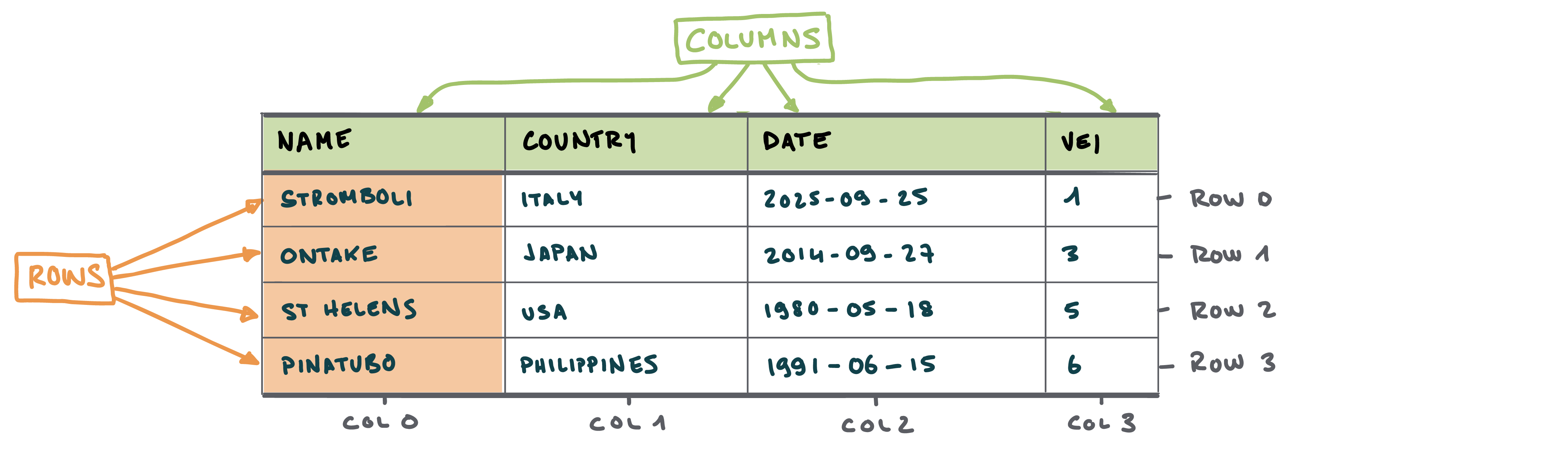
- Similar to Excel → contains tabular data composed of rows and columns
- In Excel:
- Rows are accessed using numbers
- Columns are accessed using letters
Anatomy of a DataFrame
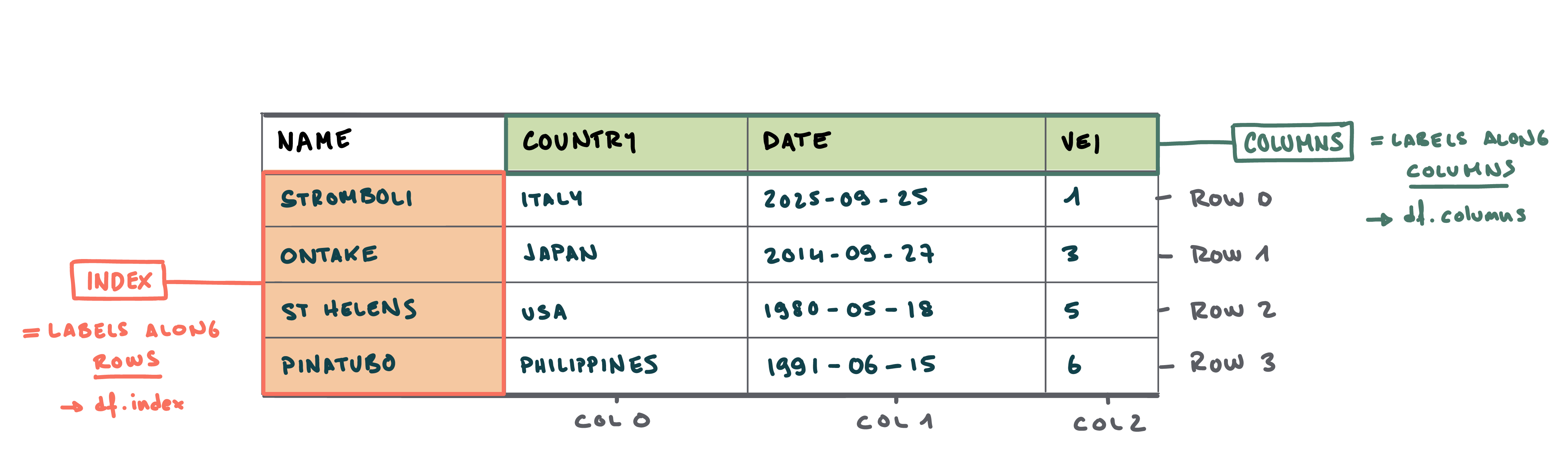
- Unlike Excel, rows and columns can be labelled
- Index refers to the label of the rows. In the index, values are usually unique - meaning that each entry has a different label.
- Column refers to the label of - logically - the columns
Data structure
The dataset
Synthetic dataset of selected volcanic eruptions → first 5 rows:
| Name | Country | Date | VEI | Latitude | Longitude |
|---|---|---|---|---|---|
| St. Helens | USA | 1980-05-18 | 5 | 46.1914 | -122.196 |
| Pinatubo | Philippines | 1991-04-02 | 6 | 15.1501 | 120.347 |
| El Chichón | Mexico | 1982-03-28 | 5 | 17.3559 | -93.2233 |
| Galunggung | Indonesia | 1982-04-05 | 4 | -7.2567 | 108.077 |
| Nevado del Ruiz | Colombia | 1985-11-13 | 3 | 4.895 | -75.322 |
Volcanic explosivity index (VEI)

Setting up the notebook
- We start by importing the
pandaslibrary - We import it under the name pd - which is faster to type!
Setting up the notebook
- We then load the specified data with the
pd.read_csv()function - This returns a DataFrame object in a variable named
df
Setting up the notebook
- We print some data for inspection with
df.head() - The functions are now directly called from the DataFrame
dfobject
# Import the required packages
import pandas as pd
# Read the data
df = pd.read_csv('https://raw.githubusercontent.com/ELSTE-Master/Data-Science/main/Data/dummy_volcanoes.csv', parse_dates=['Date']) # Load data
# Show the first 3 rows
df.head(3) | Name | Country | Date | VEI | Latitude | Longitude | |
|---|---|---|---|---|---|---|
| 0 | St. Helens | USA | 1980-05-18 | 5 | 46.1914 | -122.1956 |
| 1 | Pinatubo | Philippines | 1991-04-02 | 6 | 15.1501 | 120.3465 |
| 2 | El Chichón | Mexico | 1982-03-28 | 5 | 17.3559 | -93.2233 |
Setting the index
Setting the index
- …for now, the index (→ the first column) is an integer
- This might be acceptable in datasets where the label is not important
Setting the index
- Here we want to access the data using the name of the volcano
- We set the index using
set_index()
Exploring data
- Here are some basic functions to review the structure of the dataset:
| Function | Description |
|---|---|
df.head() |
Prints the first 5 rows of the DataFrame. |
df.tail() |
Prints the last 5 rows of the DataFrame. |
df.info() |
Displays some info about the DataFrame, including the number of rows (entries) and columns. |
df.shape |
Returns a list containing the number of rows and columns of the DataFrame. |
df.index |
Returns a list containing the index along the rows of the DataFrame. |
df.columns |
Returns a list containing the index along the columns of the DataFrame. |
Functions vs attributes
- Functions have parentheses → they compute something on
df - Attributes do not have parentheses → they store some parameter related to
df
Sorting data
- Sorting numerical, datetime or strings using
.sort_values - Importance of documentation to understand arguments
| Country | Date | VEI | Latitude | Longitude | |
|---|---|---|---|---|---|
| Name | |||||
| Nyiragongo | DR Congo | 2021-05-22 | 1 | -1.5200 | 29.2500 |
| Ontake | Japan | 2014-09-27 | 2 | 35.5149 | 137.4781 |
| Etna | Italy | 2021-03-16 | 2 | 37.7510 | 15.0044 |
| Merapi | Indonesia | 2023-12-03 | 2 | -7.5407 | 110.4457 |
| Kīlauea | USA | 2018-05-03 | 2 | 19.4194 | -155.2811 |
Sorting data
- Sorting numerical, datetime or strings using
.sort_values - Importance of documentation to understand arguments
df.sort_values('VEI').head() # Sort volcanoes by VEI in ascending number
df.sort_values('Date', ascending=False).head() # Sort volcanoes by eruption dates from recent to old| Country | Date | VEI | Latitude | Longitude | |
|---|---|---|---|---|---|
| Name | |||||
| Merapi | Indonesia | 2023-12-03 | 2 | -7.5407 | 110.4457 |
| Cleveland | USA | 2023-05-23 | 3 | 52.8250 | -169.9444 |
| Sinabung | Indonesia | 2023-02-13 | 3 | 3.1719 | 98.3925 |
| Nyiragongo | DR Congo | 2021-05-22 | 1 | -1.5200 | 29.2500 |
| La Soufrière | Saint Vincent | 2021-04-09 | 4 | 13.2833 | -61.3875 |
Sorting data
- Sorting numerical, datetime or strings using
.sort_values - Importance of documentation to understand arguments
df.sort_values('VEI').head() # Sort volcanoes by VEI in ascending number
df.sort_values('Date', ascending=False).head() # Sort volcanoes by eruption dates from recent to old
df.sort_values('Country').head() # Also works on strings to sort alphabetically| Country | Date | VEI | Latitude | Longitude | |
|---|---|---|---|---|---|
| Name | |||||
| Calbuco | Chile | 2015-04-22 | 4 | -41.2972 | -72.6097 |
| Nevado del Ruiz | Colombia | 1985-11-13 | 3 | 4.8950 | -75.3220 |
| Nyiragongo | DR Congo | 2021-05-22 | 1 | -1.5200 | 29.2500 |
| Eyjafjallajökull | Iceland | 2010-04-14 | 4 | 63.6333 | -19.6111 |
| Galunggung | Indonesia | 1982-04-05 | 4 | -7.2567 | 108.0771 |
Sorting data
- Sorting numerical, datetime or strings using
.sort_values - Importance of documentation to understand arguments
df.sort_values('VEI').head() # Sort volcanoes by VEI in ascending number
df.sort_values('Date', ascending=False).head() # Sort volcanoes by eruption dates from recent to old
df.sort_values('Country').head() # Also works on strings to sort alphabetically
df.sort_values(['Latitude', 'Longitude']).head() # Sorting using multiple columns| Country | Date | VEI | Latitude | Longitude | |
|---|---|---|---|---|---|
| Name | |||||
| Calbuco | Chile | 2015-04-22 | 4 | -41.2972 | -72.6097 |
| Agung | Indonesia | 2017-11-21 | 3 | -8.3422 | 115.5083 |
| Merapi | Indonesia | 2023-12-03 | 2 | -7.5407 | 110.4457 |
| Galunggung | Indonesia | 1982-04-05 | 4 | -7.2567 | 108.0771 |
| Tavurvur | Papua New Guinea | 2014-08-29 | 3 | -4.3494 | 152.2847 |
Your turn!
- Go to https://elste-master.github.io/Data-Science/
- Class 1 > Data Structure
Querying data
Accessing data in a DataFrame
Accessing data in a DataFrame
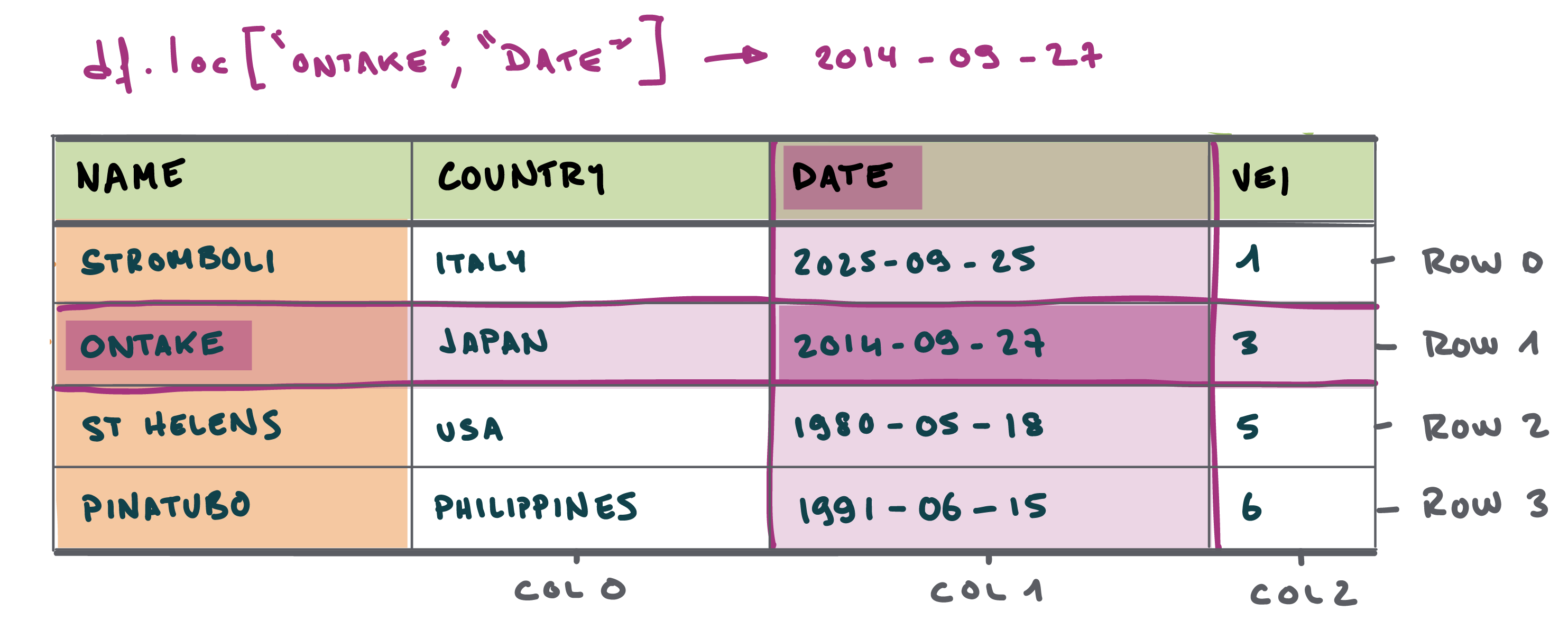
Option 1: label-based indexing
- Use the labels of index and columns to retrieve data
- Function to use:
df.loc
Accessing data in a DataFrame
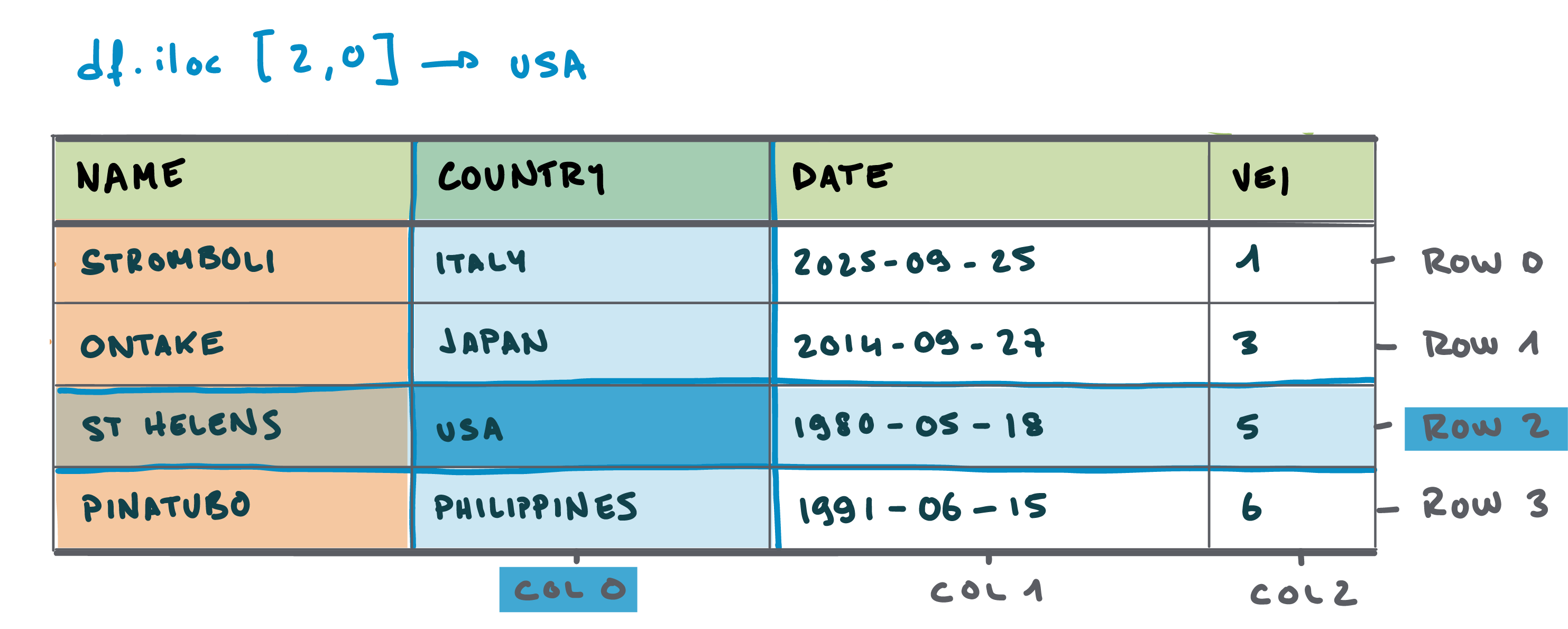
Option 2: position-based indexing
- Use the positions of index and columns to retrieve data
- Function to use:
df.iloc
Label-based indexing: Rows
- Query a row with
.loc→ Use square brackets[ ]- Query the row for which the index label is
Calbuco - Returns all columns
- Query the row for which the index label is
Label-based indexing: Rows
- Query multiple rows with
.loc- Query the rows for which the index labels are
CalbucoorTaal - Returns all columns
- Query the rows for which the index labels are
Label-based indexing: Columns
- Query columns
- Query the columns for which the column labels are
CountryorVEI - Returns all rows
- Query the columns for which the column labels are
Label-based indexing: Rows and Columns
- Again, choice on whether to use
.locto query columns
Position-based indexing
- Use positions instead of labels
Position-based indexing: Rows
- Query a row with
.iloc- Returns all columns
Position-based indexing: Rows
- Query rows from the end:
- Example:
- Get the last 5 rows of the DataFrame:
| Country | Date | VEI | Latitude | Longitude | |
|---|---|---|---|---|---|
| Name | |||||
| La Soufrière | Saint Vincent | 2021-04-09 | 4 | 13.2833 | -61.3875 |
| Calbuco | Chile | 2015-04-22 | 4 | -41.2972 | -72.6097 |
| St. Augustine | USA | 2006-03-27 | 3 | 57.8819 | -155.5611 |
| Eyjafjallajökull | Iceland | 2010-04-14 | 4 | 63.6333 | -19.6111 |
| Cleveland | USA | 2023-05-23 | 3 | 52.8250 | -169.9444 |
Position-based and label-based queries
- Mix position-based and label-based indexing:
- Rows → labels
- Columns → positions
Your turn!
- Go to https://elste-master.github.io/Data-Science/
- Class 1 > Querying data
Filtering data
Boolean indexing
- Filtering data with boolean indexing
- Returns either
TrueorFalsedepending on whether the condition is satisfied
- Returns either
Boolean indexing: Example
- Query all volcanoes where
VEI == 4
Name
St. Helens          False
Pinatubo            False
El Chichón          False
Galunggung           True
Nevado del Ruiz     False
Merapi              False
Ontake              False
Soufrière Hills     False
Etna                False
Nyiragongo          False
Kīlauea             False
Agung               False
Tavurvur            False
Sinabung            False
Taal                 True
La Soufrière         True
Calbuco              True
St. Augustine       False
Eyjafjallajökull     True
Cleveland           False
Name: VEI, dtype: bool| Country | Date | VEI | Latitude | Longitude | |
|---|---|---|---|---|---|
| Name | |||||
| Galunggung | Indonesia | 1982-04-05 | 4 | -7.2567 | 108.0771 |
| Taal | Philippines | 2020-01-12 | 4 | 14.0020 | 120.9934 |
| La Soufrière | Saint Vincent | 2021-04-09 | 4 | 13.2833 | -61.3875 |
| Calbuco | Chile | 2015-04-22 | 4 | -41.2972 | -72.6097 |
| Eyjafjallajökull | Iceland | 2010-04-14 | 4 | 63.6333 | -19.6111 |
Boolean indexing: Strings
- Filtering also works with strings
- Use string comparison operations
- Example:
Boolean indexing: Strings
- Filtering also works with strings
- Use string comparison operations
- String comparison operators:
| Operation | Example | Description |
|---|---|---|
| contains | df['Name'].str.contains('Soufrière') |
Checks if each string contains a substring |
| startswith | df['Name'].str.startswith('E') |
Checks if each string starts with a substring |
| endswith | df['Name'].str.endswith('o') |
Checks if each string ends with a substring |
Your turn!
- Go to https://elste-master.github.io/Data-Science/
- Class 1 > Filtering data
Operations
Data management operations
- Common data management functions for pandas columns:
| Operation | Example | Description |
|---|---|---|
| Round | df['VEI'].round(1) |
Rounds values to the specified number of decimals |
| Floor | df['VEI'].apply(np.floor) |
Rounds values down to the nearest integer |
| Ceil | df['VEI'].apply(np.ceil) |
Rounds values up to the nearest integer |
| Absolute value | df['VEI'].abs() |
Returns the absolute value of each element |
| Fill missing | df['VEI'].fillna(0) |
Replaces missing values with a specified value |
Arithmetic operations
- Arithmetic operations on parts of the DataFrame (→ columns) using native Python arithmetic operators
| Operation | Symbol | Example | Description |
|---|---|---|---|
| Addition | + |
df['VEI'] + 1 |
Adds a value to each element |
| Subtraction | - |
df['VEI'] - 1 |
Subtracts a value from each element |
| Multiplication | * |
df['VEI'] * 2 |
Multiplies each element by a value |
| Division | / |
df['VEI'] / 2 |
Divides each element by a value |
| Exponentiation | ** |
df['VEI'] ** 2 |
Raises each element to a power |
| Modulo | % |
df['VEI'] % 2 |
Remainder after division for each element |
Expanded arithmetic operations
- The range of arithmetic operations can be expanded using
numpy
| Operation | Symbol | Example | Description |
|---|---|---|---|
| Exponentiation | np.power |
np.power(df['VEI'], 2) |
Element-wise exponentiation |
| Square root | np.sqrt |
np.sqrt(df['VEI']) |
Element-wise square root |
| Logarithm (base e) | np.log |
np.log(df['VEI']) |
Element-wise natural logarithm |
| Logarithm (base 10) | np.log10 |
np.log10(df['VEI']) |
Element-wise base-10 logarithm |
| Exponential | np.exp |
np.exp(df['VEI']) |
Element-wise exponential (e^x) |
Your turn!
- Go to https://elste-master.github.io/Data-Science/
- Class 1 > Operations