ELSTE Data science

Class 1: Introduction to data analysis and inference using Python

Sébastien Biass

Earth Sciences

Stéphane Guerrier

Earth Sciences

Pharmaceutical Sciences

October 14, 2026

Get ready

Why this class?

Data deluge: The big EO data landscape
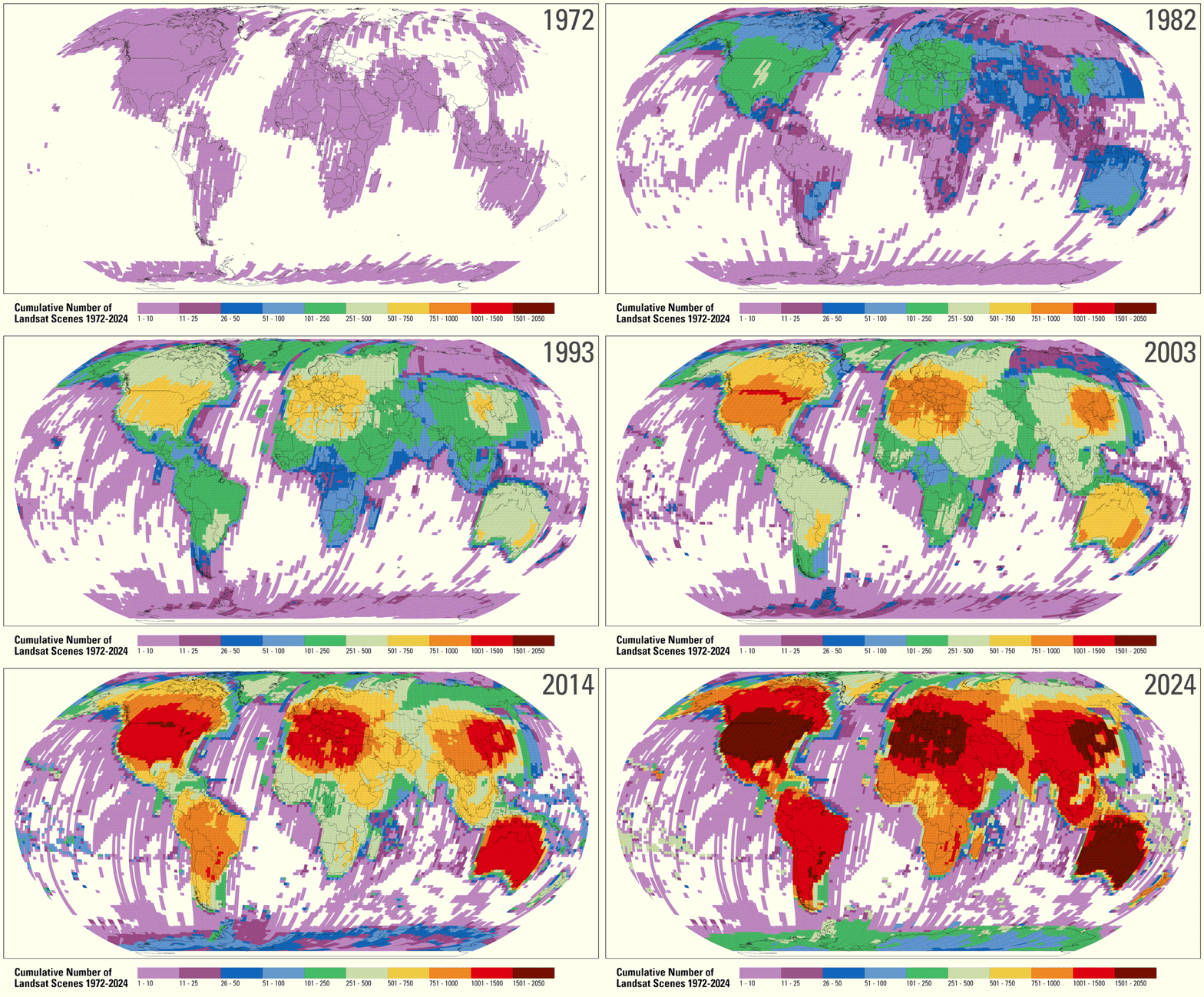
  • Landsat:
    • Download: 53 images/day (2001) - 220’000 images/day (2017)
    • 5 million images of the Earth surface → > 5 PB
  • ESA Sentinel 1 & 2 → 4.6TB /daily!

Why this class?

As scientists, we are exposed to:

  • Increasing computational power/facilities
  • Increasing amount of data

How do we make sense of it all?

  • Scientific coding → gateway to scientific data analysis
  • Data science → extracting meaningful infomation and insights from data
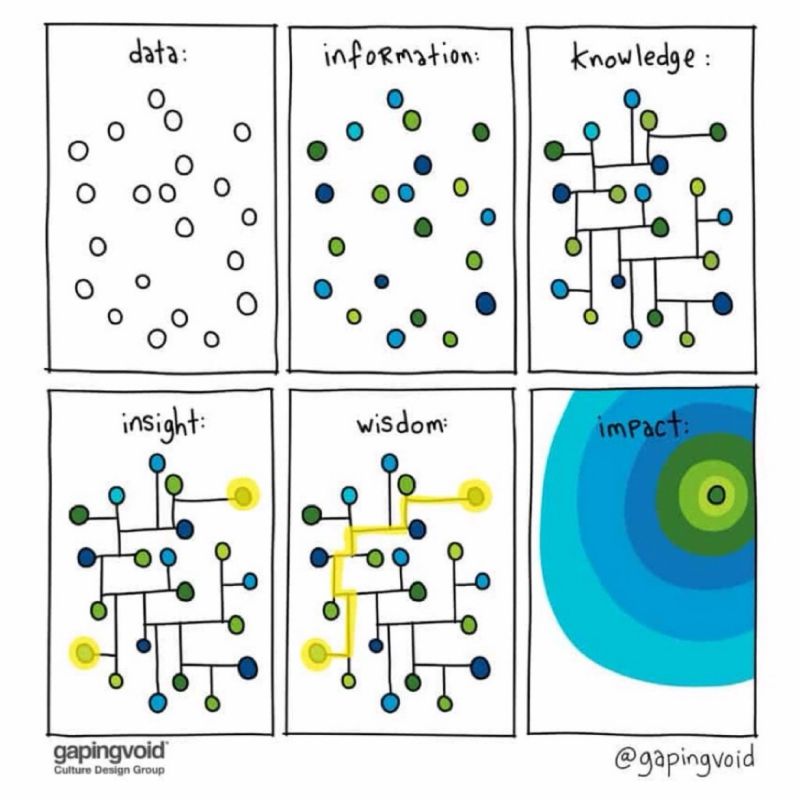
What is data science

Wikipedia

Data science is an interdisciplinary academic field that uses statistics, scientific computing, scientific methods, processing, scientific visualization, algorithms and systems to extract or extrapolate knowledge from […] data.

National Institutes of Standards and Technology

The field that combines domain expertise, programming skills, and knowledge of mathematics and statistics to extract meaningful insights from data.

Class schedule

  • Fall part at UNIGE: 6 \(\times\) 3-h long sessions
  • Assistants: Sofia Hernandez Castro, Henry Hoult
  • Format: Theory, live coding and exercises

October 14 and 21

  • Seb → Exploratory data analysis

October 28, November 4 and 11

  • Stéphane → Inference

November 18

  • Question session + exam

Class objectives

  • Scientific coding and stats often appear daunting
  • True, there can be a steep learning curve

Objectives

  • Not to make you and expert developer / statistician but
    • Motivate scientific reasoning
    • Develop statistical thinking

Get involved!!!

We want this class to be useful for your research!

Try to contextualise the course material to your research:

  • Do you already have your own datasets you could bring to class?
  • Can you use the course to formulate new research questions?
  • Do you know any open-access datasets relevant to your fields?
    • If not, can you find some for the next weeks?

Open data in geosciences

Database What can you find?
PANGAEA About 447,000 datasets: marine geology, geochemistry, palaeoclimate and ecology. Documented datasets with citable DOIs.
EarthScope Continuous seismic records from thousands of stations. 590 TB archived by 2019; over 215 TB of new geophysical data in 2024.
NOAA Paleoclimatology Over 10,000 datasets from ice cores, tree rings, corals and sediments, extending climate records over thousands to millions of years.
EarthChem Geochemical databases searchable by location, age, tectonic setting, sample and composition.
IODP³ Ocean-drilling measurements, images and metadata, normally open after a one-year embargo; physical cores available from repositories.

Open Earth-observation data

Database What can you find?
Landsat Over 13.8 PB of imagery since 1972. About 1 TB/day of new observations and 3 TB/day of derived scientific products.
Copernicus Sentinel Radar, optical and atmospheric observations. Sentinel 1 & 2 acquire 4.6 TB/day; the former portal distributed about 590 PB to 750,000 users before closing in 2023.
NASA EOSDIS Observations of the atmosphere, oceans, ice, biosphere and land. Higher-resolution missions drive archive growth and analysis in the cloud.
ERA5 Hourly global climate reanalysis: 200+ variables on an approximately 31 km grid. About 5 PB of native data and 1 PB prepared for distribution.
NOAA NCEI Open weather, ocean, coastal and geophysical archives from historical records, stations, buoys, ships and other observing systems.

Why coding?

Motivations

  • Example: A common - but unnecessarily complicated - workflow of many specialised softwares

%%{init: {"theme":"dark"}}%%
flowchart LR
    B[Data Collection]
    B --> C[Data Cleaning]
    C --> D[Analysis]
    D --> E[Visualisation]

  • Objective: Integrate full research workflow in an environment supporting all tasks

flowchart LR
    B[Start]
    B --> C["<img src='img/python.png' width='20'>"]
    C --> D[End]

Motivations

Motivation 1: Automation

Cotopaxi volcano

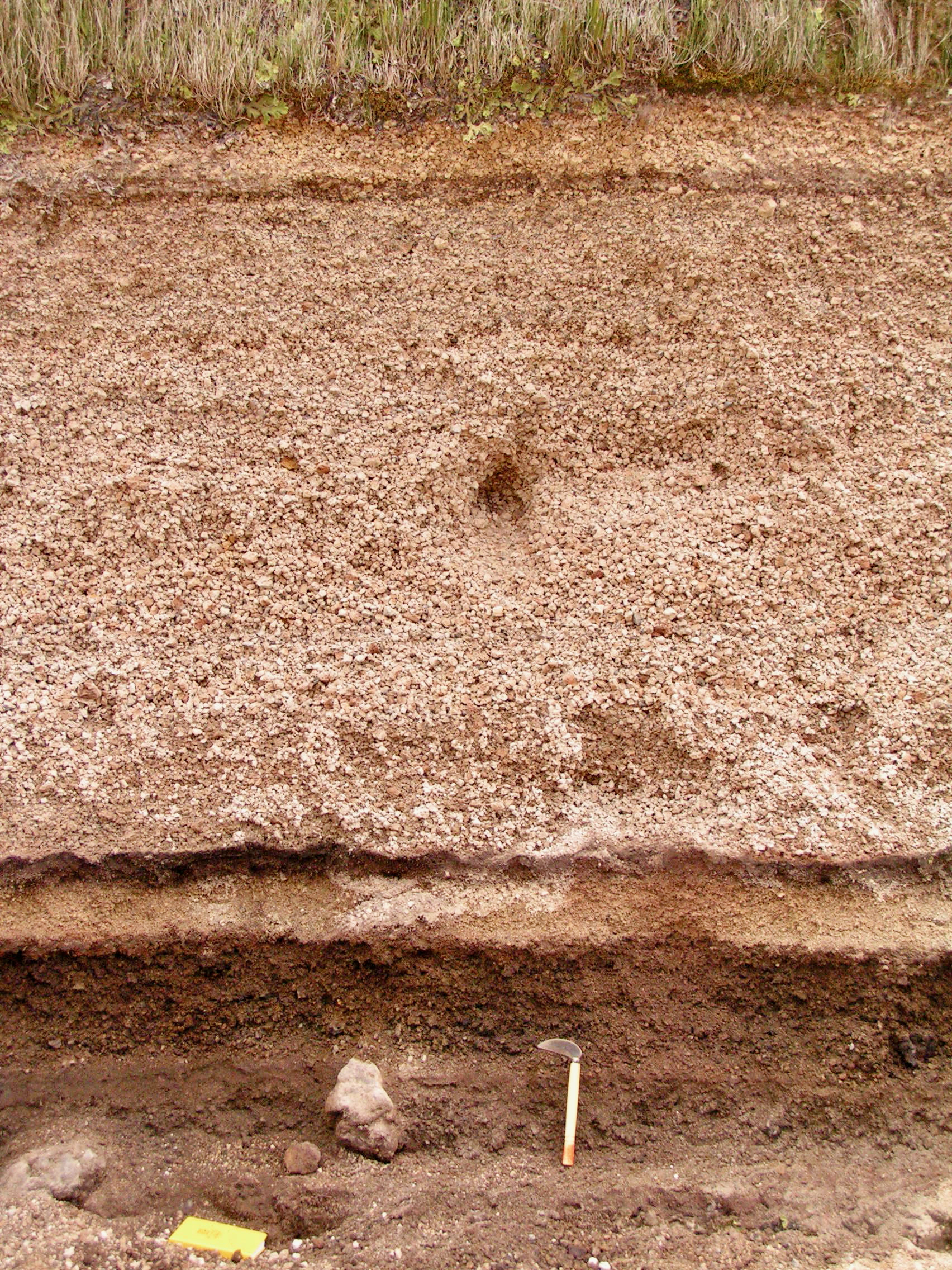
  • Reconstructing eruption source parameters (ESP) from tephra deposits
    • How do different measurement methods influence ESP estimates?
  • 40 outcrops
  • ~10 samples per outcrop
  • ~7 measurement methods per sample

Motivations

Motivation 2: Data analysis

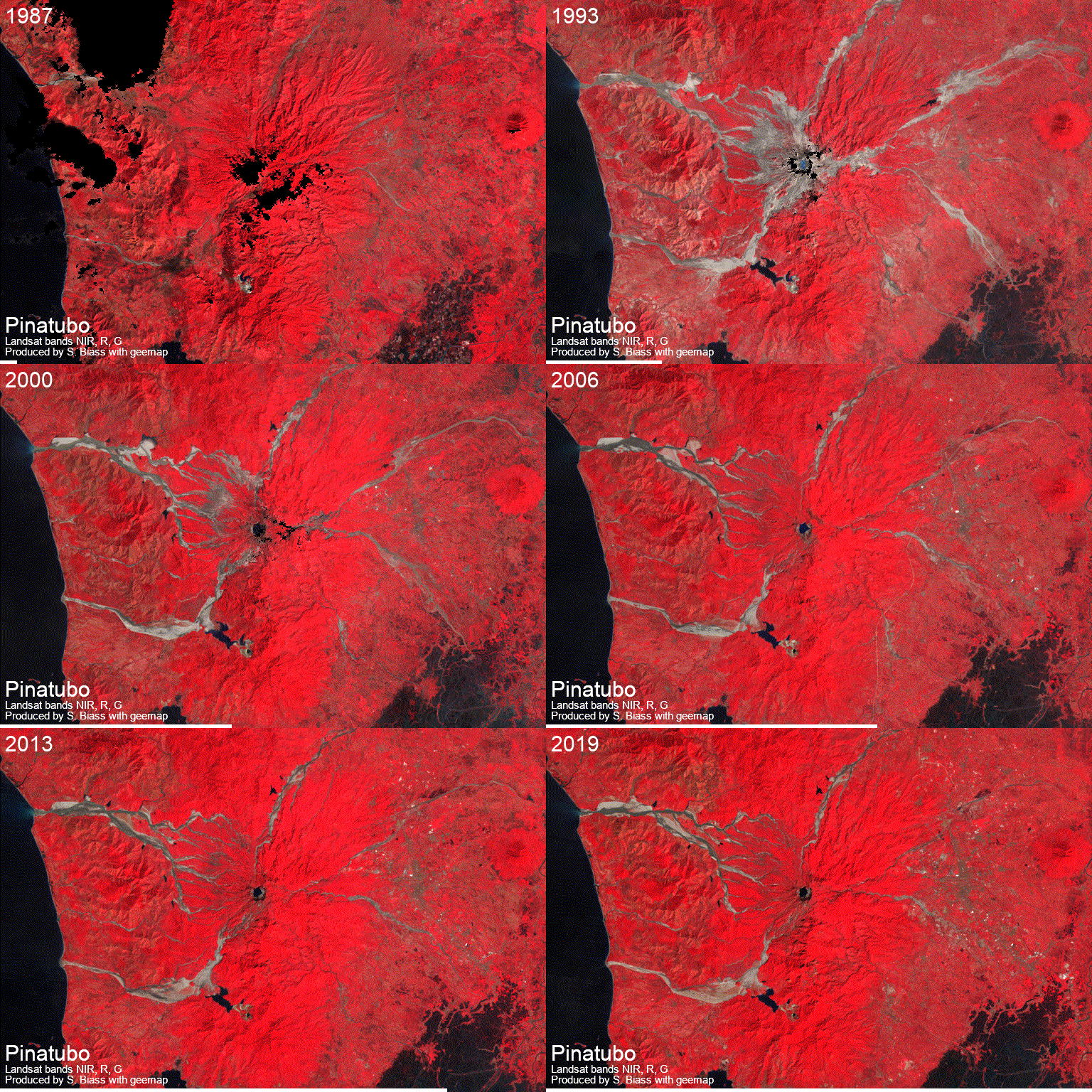
Example 1: Exploit catalogues of big Earth Observation data

  • Revisit big EO catalogues to infer new knowledge
    • What controls the impact and recovery of vegetation following eruptions?
Motivations

Motivation 2: Data analysis

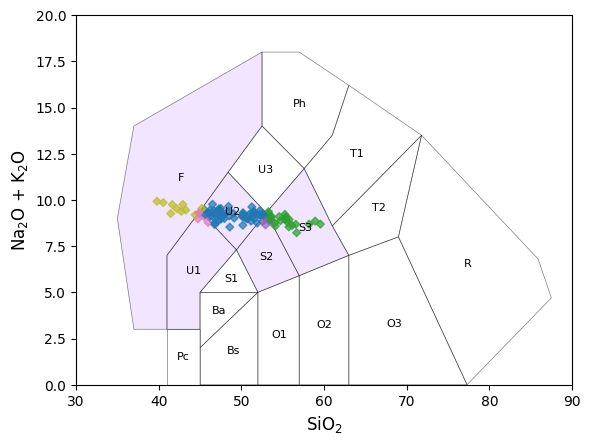
Example 2: Streamline global geochemical analyses

  • Access global databases
    • e.g., Georock database
  • Automatic dedicated analyses/plots
    • e.g., TAS diagrams and classification using pyrolite
Motivations

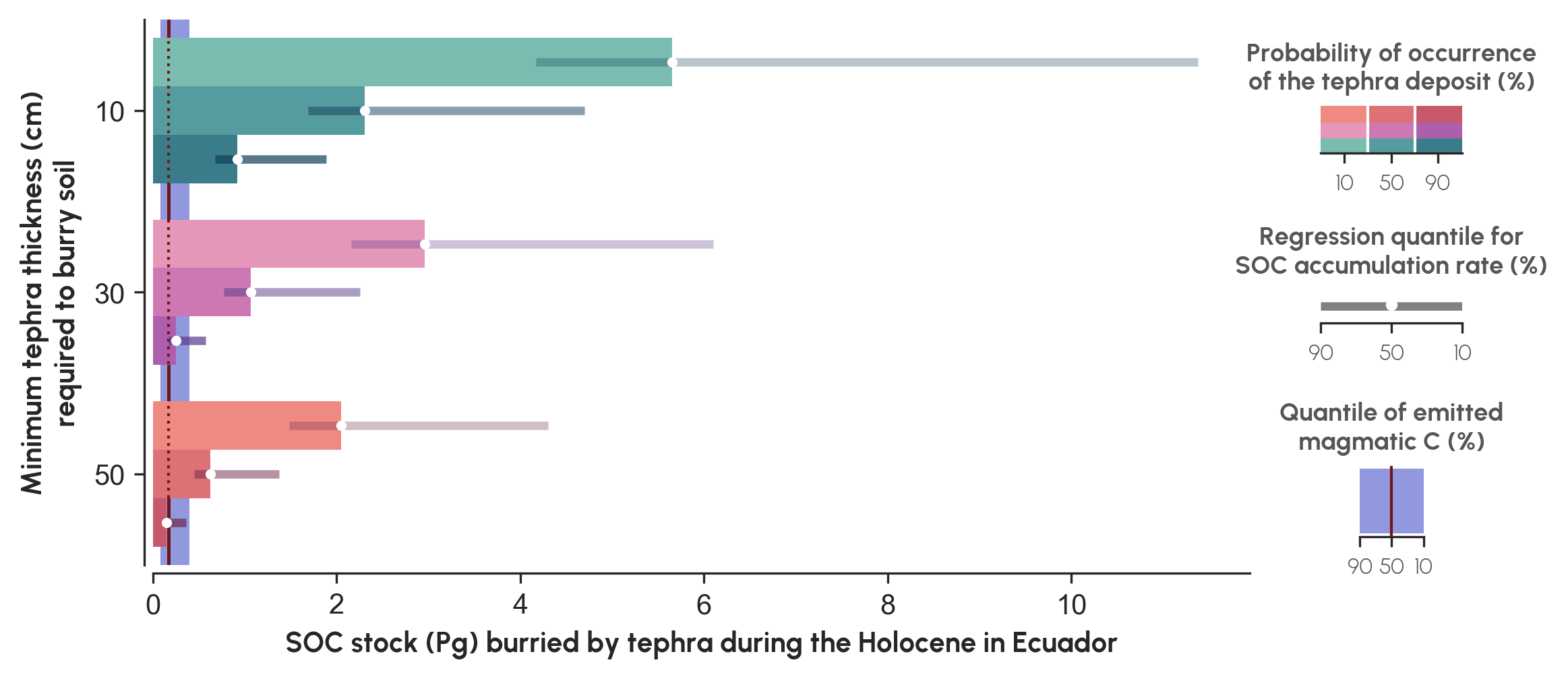
Motivation 3: Visualisation

Example 1: In volcanically-active regions, soil burial after explosive eruptions capture more carbon that they emit.
Motivations

Motivation 3: Visualisation

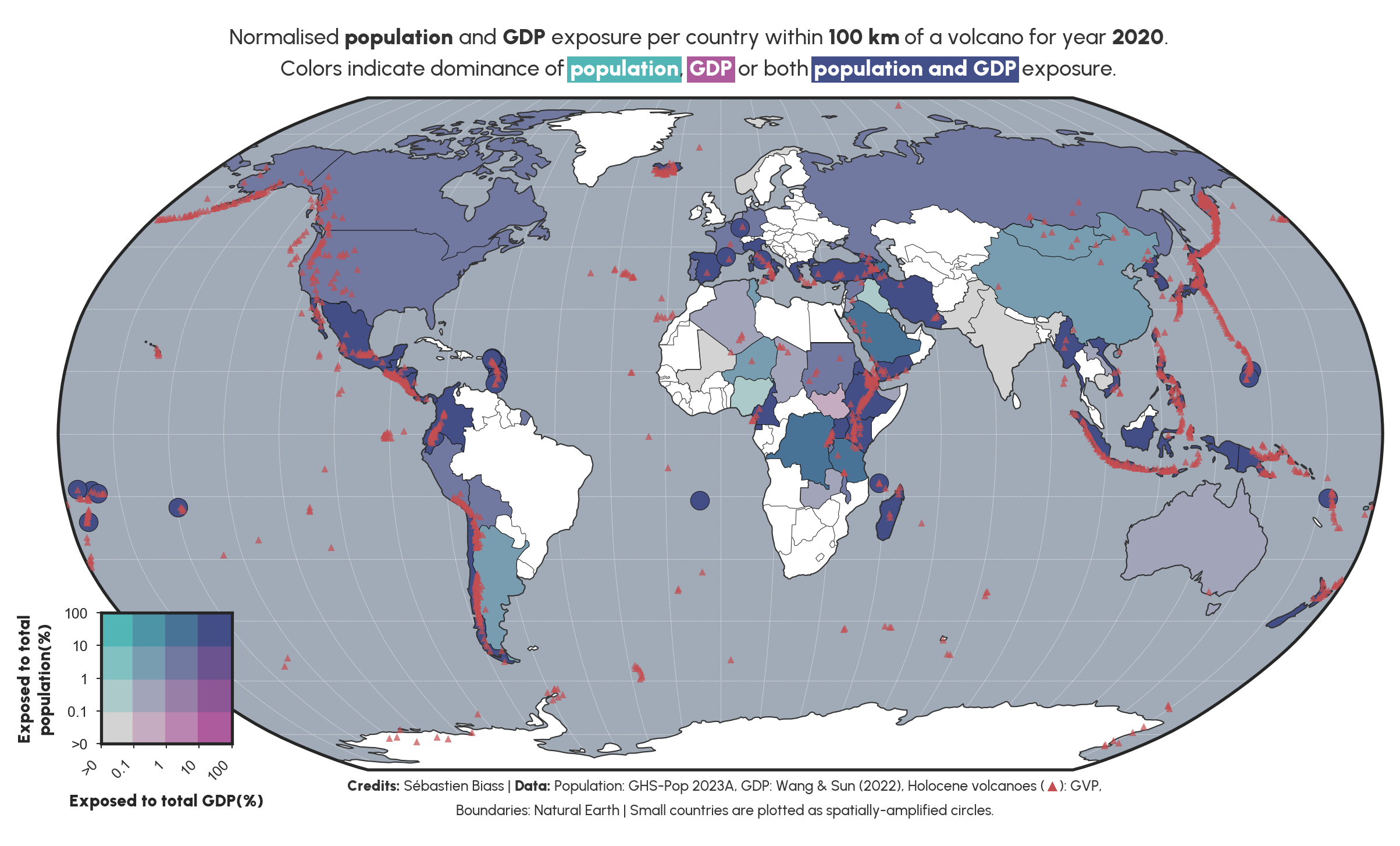
Example 2: In Small Island States, ≥90% of population and GDP is exposed to volcanic hazards.
Why Python?

Python’s advantages 1

  1. Free
  2. Open source
    • Not dependent on any company
    • Large online community
  3. Old → stable (started in 1991)
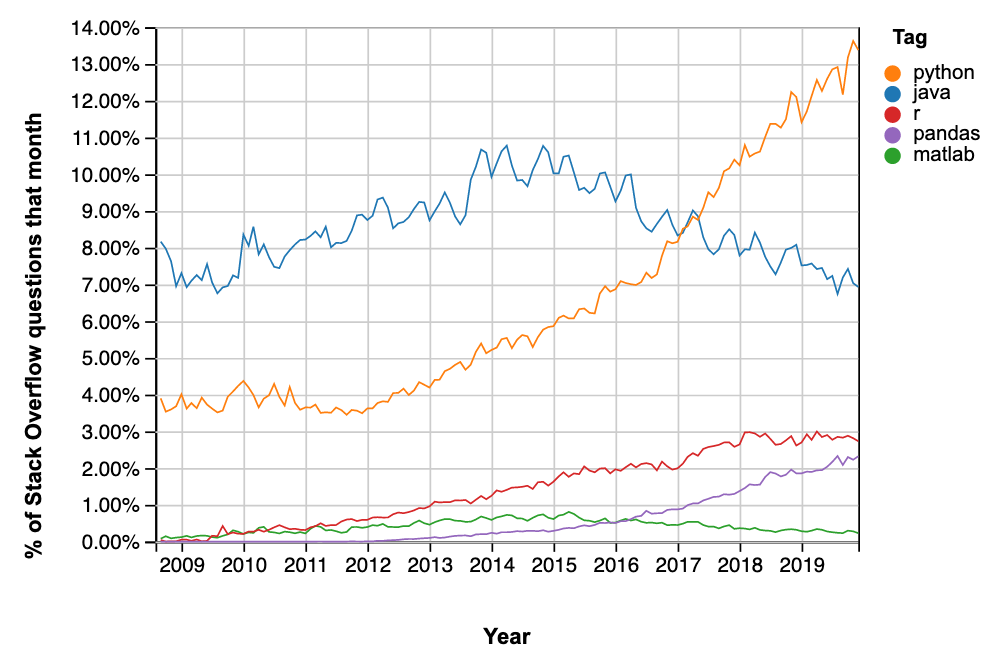
  4. Very popular in science
  5. Relatively easy to learn

What is Python

High-level computing language

  • Compiled → doesn’t directly speak to the computer, but is interpreted by another language
    • Usually slower, but much, much easier to use!

Modular

  • Python is composed of a core of functions complemented by wide ecosystem of specialized packages for specific tasks
    • A function is a bit of code to perform a specific task
    • A module is a collection of functions
    • A package is composed by multiple modules

An example of packages, modules and functions

In the code below, we first load the necessary packages and libraries:

  • matplotlib is the main visualisation package used in Python
  • pyplot is a module of matplotlib that provides easy-to-use functions for plotting data
  • figure is a function of pyplot and is the main function to prepare a plot
# Import the packages and modules
from matplotlib import pyplot as plt 
# Set up a figure for plotting
plt.figure(...) 

How to use Python

Option 1: Your own computer

  • Requires some setup
  • No internet connection required
  • Slow if computer is slow
  • All data stored on your own computer

Option 2: In the cloud → Google Collab

  • No setup required
  • No internet connection required
  • Decent speed, free as long as Google says it is free
  • All data stored in the cloud

How to run Python

3 main ways to run Python…

  1. Run Python .py scripts from the command line → deprecated
  2. Run blocks of code from within a Python .py script using ipykernel → similar behaviour to R/Matlab
  3. Use Jupyter Notebooks in .ipynb files

…in two different environments

  1. Dedicated software: VSCode, PyCharm, Spyder
  2. Web browser: JupyterLab

How to approach coding

Python as a natural language

Natural language Python Example
Noun Object or variable df
Verb Function or method mean(), sort_values()
Complement Target variable "altitude"
Adverb Argument specifying how ascending=False
Sentence Instruction df.sort_values(...)
df.sort_values("altitude", ascending=False)

Python checks the grammar of your code. You must check the scientific meaning of the sentence.

From a sentence to a sequence of tasks


Task Questions to ask
Load Where are the data? How do I read them?
Inspect What do the rows, columns and values represent?
Select / filter Which columns and observations do I need?
Transform What should I sort, recode or calculate?
Summarise / analyse What quantity or relationship answers my question?
Visualise / export How should I show or save the result?

Today’s plans

Pandas

pandas: A package for data manipulation and analysis handling structured data

  • Reading/writing data from common formats (CSV, Excel, JSON, etc.)
  • Handling missing data
  • Filtering, sorting, reshaping and grouping data
  • Aggregating data (sum, mean, count, etc.)
  • Time series support (date ranges, frequency conversions)
  • Statistical operations

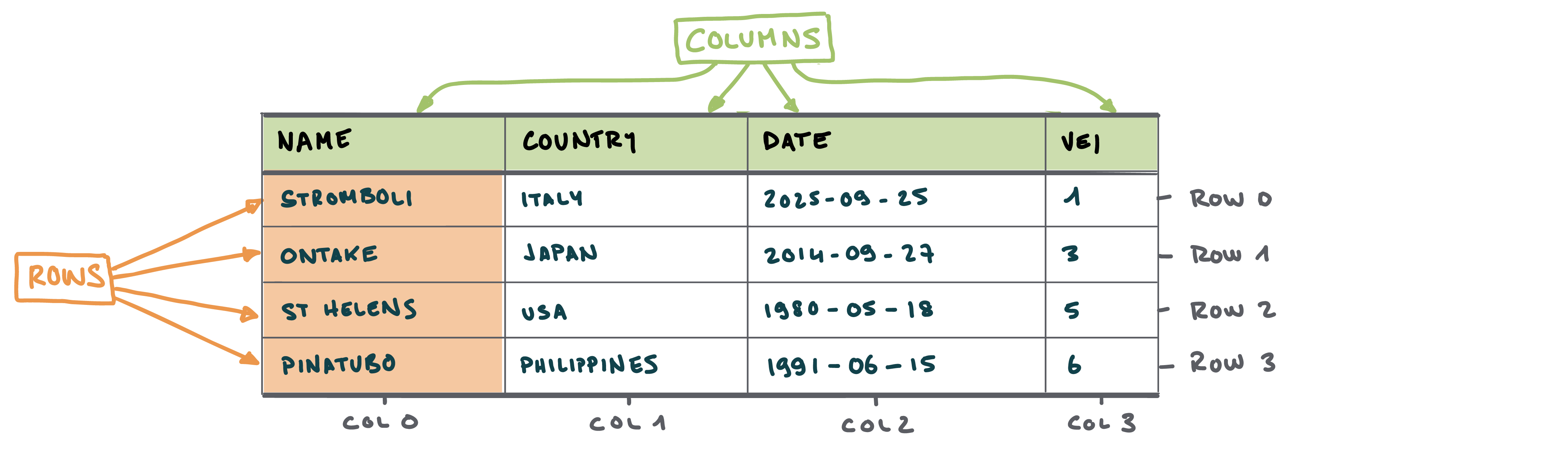
Anatomy of a DataFrame

  • Similar to Excel → contains tabular data composed of rows and columns

  • In Excel:

    • Rows are accessed using numbers
    • Columns are accessed using letters

Anatomy of a DataFrame
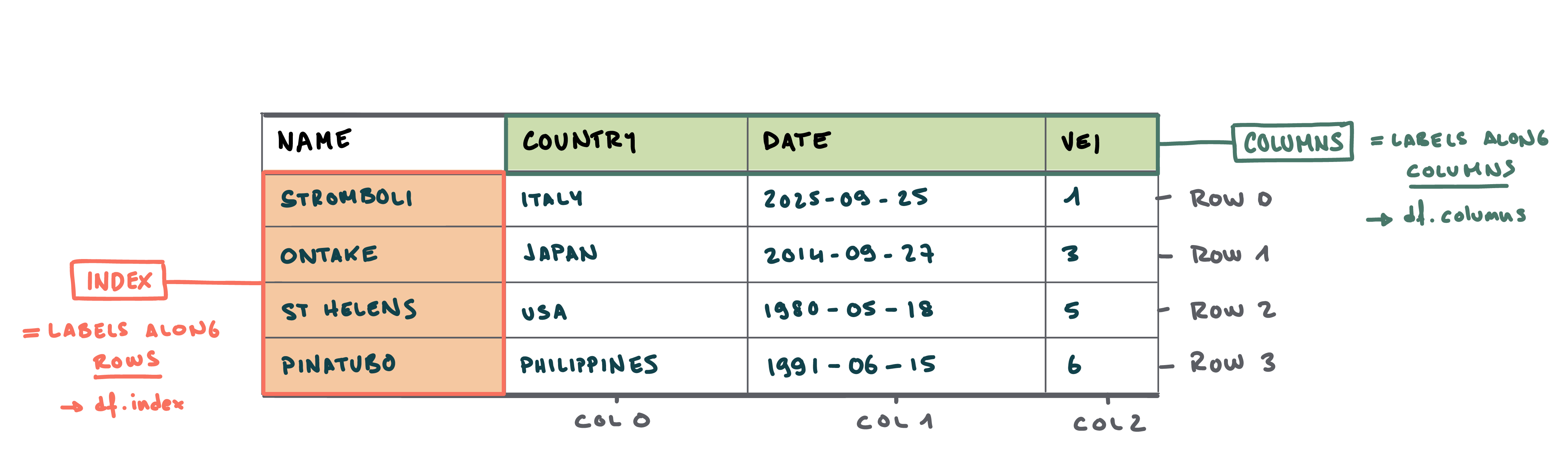
  • Unlike Excel, rows and columns can be labelled
    • Index refers to the label of the rows. In the index, values are usually unique - meaning that each entry has a different label.
    • Column refers to the label of - logically - the columns

Today’s dataset

Synthetic dataset of selected volcanic eruptions → first 5 rows:

Name Country Date VEI Latitude Longitude
St. Helens USA 1980-05-18 5 46.1914 -122.196
Pinatubo Philippines 1991-04-02 6 15.1501 120.347
El Chichón Mexico 1982-03-28 5 17.3559 -93.2233
Galunggung Indonesia 1982-04-05 4 -7.2567 108.077
Nevado del Ruiz Colombia 1985-11-13 3 4.895 -75.322

Volcanic explosivity index (VEI)

Today’s objectives

5 modules:

  1. How to load data in a DataFrame
  2. How to access data → query by label/position
  3. How to filter data → comparison and logical operators
  4. How to rearrange data → sorting values
  5. How to operate on data → arithmetic and string operations
  • We expect you to know how to get started with Python / Jupyter notebook
  • Let us know if you are lost or if you already know all of this
    • Let’s make it useful for your research

Get started

How to do it?

  • Create a Jupyter Notebook
  • Copy & paste code fragment → make sure you understand what you are doing!
  • Document your code with Markdown